Engineering Note
Kafka 4.4.0: New Options for Failure Handling, Recovery, and Cost
A practical look at Kafka 4.4.0: Share Group DLQs, rack-aware partitioning, Streams state recovery, CIDR ACLs, and delayed tiered-storage uploads.

Apache Kafka released 4.4.0 on October 22, 2026. Notable changes address repeatedly failing records, Streams state recovery, and network and storage costs. The release also adds access control by IP range.
This post selects five changes from the full release notes, focusing on the operational problems they address and the conditions for using them. Configuration examples include only the relevant settings.
| Change | Useful when | Check first |
|---|---|---|
| Share Group DLQs | Investigating and replaying failed records | share.version=2, a prepared destination topic, and group settings |
| Rack-aware producer partitioning | Reducing cross-zone traffic | Disabled by default; records with flexible partition placement |
| Transactional Streams state stores | Reducing full state rebuilds after errors | Disabled by default; store implementation support |
| CIDR-based ACLs | Managing access by IP range | metadata.version of 4.4-IV1 or later |
| Delayed tiered-storage uploads | Shortening overlapping local and remote retention | Time and size conditions, plus local disk headroom |
1. Share Groups: send failed records to a DLQ
Share Groups provide queue-like consumption, distributing records across workers. Version 4.4.0 adds dead-letter queue (DLQ) support. Records explicitly rejected with REJECT, or those reaching their delivery-attempt limit, can be sent to a separate topic for investigation. The broker handles these DLQ writes. KIP-1191
This requires share.version=2. The group setting errors.deadletterqueue.topic.name defaults to an empty string, so a destination must be configured. Group configuration, 4.4.0 feature version definitions
Prepare the destination topic as well. By default, DLQ topics are not created automatically and their names must start with dlq.. Set errors.deadletterqueue.group.enable=true on the destination. Cluster settings can change the naming prefix and automatic creation policy. Broker configuration, topic configuration
Choose what to retain. errors.deadletterqueue.copy.record.enable defaults to false, recording only context such as the original location and failure reason. Enable it to copy the original key, value, and headers as well. Group configuration
Retention expiry or log compaction may already have removed the original record. DLQ writes and consumption-state changes are not one atomic transaction, so duplicates are possible. Some write errors move the record to Archived, excluding it from redelivery even though the DLQ write failed. Monitor DLQ write errors and make replay tolerant of duplicates. DLQ processing and failure policy
For an image conversion job, for example, recovery might involve fixing the failure and replaying with the original job ID to detect duplicate execution. The DLQ provides a starting point for that workflow.
2. Producers: prefer a leader in the same rack
Kafka deployments spanning availability zones (AZs) can incur cross-zone transfer costs. Rack-aware partitioning lets the built-in partitioner prefer partitions whose leaders are in the producer’s rack. In a cloud deployment, rack identifiers can represent AZs. KIP-1123
For a Kafka 4.4 Java producer, the relevant settings are below. Replace az-a with a real value matching the brokers’ broker.rack convention.
client.rack=az-a
partitioner.rack.aware=true
The feature defaults to false. A typical use case is records without an explicit partition or key, which can go to any partition. It does not relocate records assigned by key hashing or an explicit partition. Custom partitioners are unaffected. When no suitable local leader is available, selection falls back to all available partitions. Producer configuration
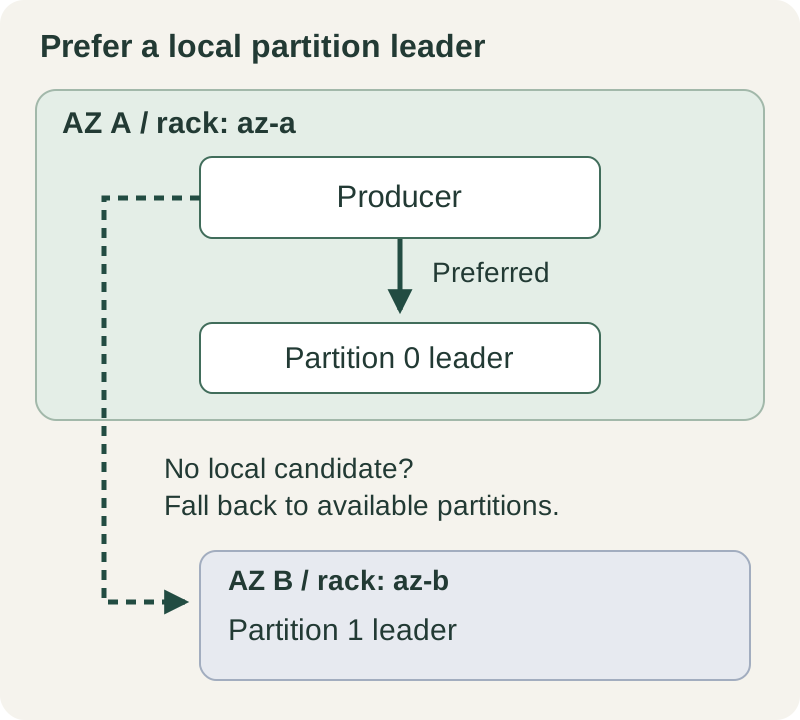
Evaluate traffic skew alongside savings. If producers cluster in AZ A while leaders are evenly distributed, writes may concentrate on a subset of partitions. Compare cross-zone bytes, per-partition input, and produce latency before and after enabling it. Broker replication traffic still exists.
3. Streams: reduce recovery work and extend header support
Kafka Streams keeps aggregates and other state in local stores, recording changes in Kafka changelog topics. Even with Exactly-Once Semantics (EOS), an error can leave these states inconsistent and require a local rebuild. Larger state makes that recovery more expensive.
Transactional state stores buffer writes and apply them in coordination with the changelog transaction commit. Supported stores can retain previously committed state after errors and replay work since the last successful commit. KIP-892
These settings evaluate the feature in an EOS application while exposing committed state to queries:
processing.guarantee=exactly_once_v2
enable.transactional.statestores=true
default.interactive.query.isolation.level=READ_COMMITTED
enable.transactional.statestores defaults to false. Interactive Queries, which read state directly, default to READ_UNCOMMITTED. Choosing READ_COMMITTED makes new values visible after commit, trading freshness for committed visibility.
Buffer memory also needs attention. statestore.uncommitted.max.bytes defaults to 64 MiB per application instance and triggers earlier commits as uncommitted data grows. It is not a hard limit on total memory usage. Streams configuration in 4.4.0
This does not guarantee fast recovery from every failure. Losing local storage or moving a task to a node without its state still requires restoration. Check custom store support, and remember that this does not extend EOS to external databases or APIs.
Header support also expands: StreamPartitioner can receive headers, and Interactive Queries v2 gains queries that return state with headers. This helps applications using headers in routing decisions. Existing lambda implementations do not simply receive the new header argument; review the interface implementation. Partitioner change, queries with headers
4. ACLs: manage ranges instead of individual IP addresses
Host conditions previously used individual IP addresses or *. They can now use CIDR (Classless Inter-Domain Routing) notation. Access Control List (ACL) options --allow-host and --deny-host accept IPv4 ranges such as 192.168.10.0/24, as well as IPv6 ranges. This reduces the burden of listing addresses in environments where client IPs change frequently. KIP-1276
The feature requires metadata.version of 4.4-IV1 or later. Use the version check in the 4.4.0 release code, rather than the preliminary version notation remaining in the KIP. Replacing broker binaries alone does not establish that it is enabled.
Permission semantics still matter. DENY takes precedence when both ALLOW and DENY match; a narrower ALLOW does not override a broader DENY. Host conditions do not replace authenticated identities or resource and operation permissions. Behind NAT or proxies, verify the source address the broker actually sees, and test requests from outside the allowed subnet as well.
5. Tiered Storage: delay remote uploads
Tiered Storage combines local broker logs with remote storage. Uploading segments early can extend the period during which the same data exists both locally and remotely. Delayed upload provides a way to shorten that overlap. KIP-1241
For a topic already using Tiered Storage, remote.copy.lag.ms controls the time condition and remote.copy.lag.bytes the size condition. The time default is 0, keeping inactive segments immediately eligible for upload. The size default, -1, follows the local retention size setting. Either condition can make a segment eligible, so changing only the size setting while leaving time at 0 may not create the intended delay. Topic configuration
For example, with seven days of overall retention, three days of local retention, and no size limits, a one-day delay can avoid a redundant remote copy of the newest day of data. The time check uses the timestamp of the latest record in the segment. Upload eligibility is determined per segment.
Segments cannot be deleted locally before their uploads complete. Longer delays combined with a remote-storage outage or upload backlog can therefore increase local disk pressure. Systems relying on remote copies also see data later. Set upload delay against disk headroom and remote-data freshness requirements, as well as storage cost. Delayed-upload operations guide
What else to check before upgrading
Connection and deployment behavior also changes. A positive bootstrap.resolve.timeout.ms enables asynchronous DNS resolution retries during client bootstrap. It defaults to 0, and Streams and Connect do not yet support this mode.
Connect adds internal.topics.automatic.creation.enable=false to disable automatic internal-topic creation. Missing required topics then cause startup to fail, so provision them before deployment. Release announcement
Before production rollout:
- Separate software versions from feature levels. Record broker, controller, and client versions alongside
metadata.versionandshare.version. Review compatibility and rollback limits for feature-level changes separately. - Review authentication settings. For brokers validating JWTs through a JWKS endpoint, check
sasl.oauthbearer.expected.audienceandsasl.oauthbearer.expected.issuer. Under the default validation policy, missing values prevent startup. - Match the storage formatting tool. Do not format new storage with a
kafka-storage.shnewer than the broker that will use it. Lowering--release-versiondoes not replace this requirement. - Update deprecated settings and monitoring.
broker.idand the old Yammer-based group coordinator metrics are deprecated. Prepare to usenode.idand the replacement metrics. - Test Streams recovery and partition placement. Measure recovery time, buffer memory, and query visibility. If serializers consume headers or use windowed keys, verify resulting partitions and co-partitioning as well.
Check the path from your current version against the Kafka upgrade guide and the Streams upgrade guide. Strimzi and managed-service users should also verify their platform’s Kafka 4.4 support separately.
The value of this release depends on the workload. Start with DLQs if failed-record handling is difficult, or transactional state stores if Streams rebuilds take too long. When transfer or storage costs dominate, evaluate rack-aware partitioning and delayed uploads against the corresponding cost measurements.
Further Reading
- Consumer Groups Are Not Queues: What Kafka Share Groups Change — The consumption and acknowledgement model explains where DLQs fit.
- Kafka EOS: What Is Actually Exactly Once? — Distinguish transactional state from idempotency in external systems.