Engineering Note
Kafka Streams After 4.2: Two Changes That Make Failures Less Painful
Kafka Streams operations often hurt around bad records and rebalances. This post explains how DLQ support and the Streams Rebalance Protocol change the operating model after Kafka 4.2.
Kafka Streams failures do not always arrive as one big incident.
Sometimes the problem is a single record. Deserialization fails, a value violates an assumption in the processor, or an output write fails. One bad record can kill a stream thread, stop the application, and start building lag.
Another painful moment is rebalance. When you scale out, redeploy, or lose an instance, Kafka Streams must move tasks and state. That is much heavier than moving plain consumer partition ownership.
Two common Kafka Streams pain points:
  one bad record can shake the whole application
  rebalance can move task and state ownership
After Apache Kafka 4.2, two changes help reduce that pain:
- Kafka Streams DLQ support
- Streams Rebalance Protocol
Neither one magically removes operational problems. But both move work that operators often had to implement or reason about themselves into standard Kafka Streams features and protocols.
Why One Bad Record Can Hurt
Kafka Streams continuously reads records, runs them through the topology, updates state stores when needed, and writes output records.
That flow can fail at record level.
input topic
  -> deserialize
  -> process
  -> update state store
  -> produce output
Exceptions can happen at several points.
- The input key or value format is invalid.
- A schema changed and the application has not caught up.
- A value violates a business rule.
- A custom processor or external library throws an exception.
- Serialization or production of the output record fails.
Kafka Streams already had exception handlers. But operationally, the choices were uncomfortable.
| Approach | Operational problem |
|---|---|
| Fail the application | One bad record can stop the whole Streams app |
| Log and continue | The bad record can disappear into logs |
| Build your own DLQ | Each application repeats handler and producer logic |
This is where DLQ support matters.
DLQ Is a Standard Path for Isolating Failed Records
Kafka Streams DLQ support provides a path to send failed records to a separate Kafka topic.
Suppose an order aggregation application looks like this:
orders
  -> order-aggregator
  -> order-counts
Failed records can be sent to a topic such as:
order-aggregator-dlqThat lets normal records continue through the main flow while failed records remain available for analysis and replay.
But the boundary matters.
DLQ = a path to isolate failed records
DLQ != automatic recovery
A record in the DLQ does not mean the problem is solved. Operators still need to decide who reviews those records, how they are corrected or replayed, and how repeated failures are blocked.
The Configuration Is Simple, but the Meaning Is Not
Kafka Streams has a configuration for the DLQ topic name:
errors.dead.letter.queue.topic.name=order-aggregator-dlqThe official Kafka Streams configuration says that if this value is not null, the default exception handler can build and send a DLQ record to the configured topic when an error occurs. It also says this setting can be ignored by custom deserialization, production, or processing exception handlers. It applies only to regular stream processing tasks, not global state store updates.
So the safer mental model is:
DLQ topic configuration:
  provides the default destination for failed records

Exception handler configuration:
  decides whether processing resumes, fails, or retries
Do not read this single setting as “the application will always keep running.” Default handlers may still fail. If you use custom handlers, the custom handler may need to build DLQ records itself.
In production, it is usually better to create the DLQ topic explicitly instead of relying on auto-creation.
kafka-topics.sh \
  --bootstrap-server broker1:9092 \
  --create \
  --topic order-aggregator-dlq \
  --partitions 3 \
  --replication-factor 3
When available, the DLQ record can include the raw key/value of the source record and metadata such as source topic, partition, offset, exception, and stacktrace in headers. That metadata is what makes later investigation possible.
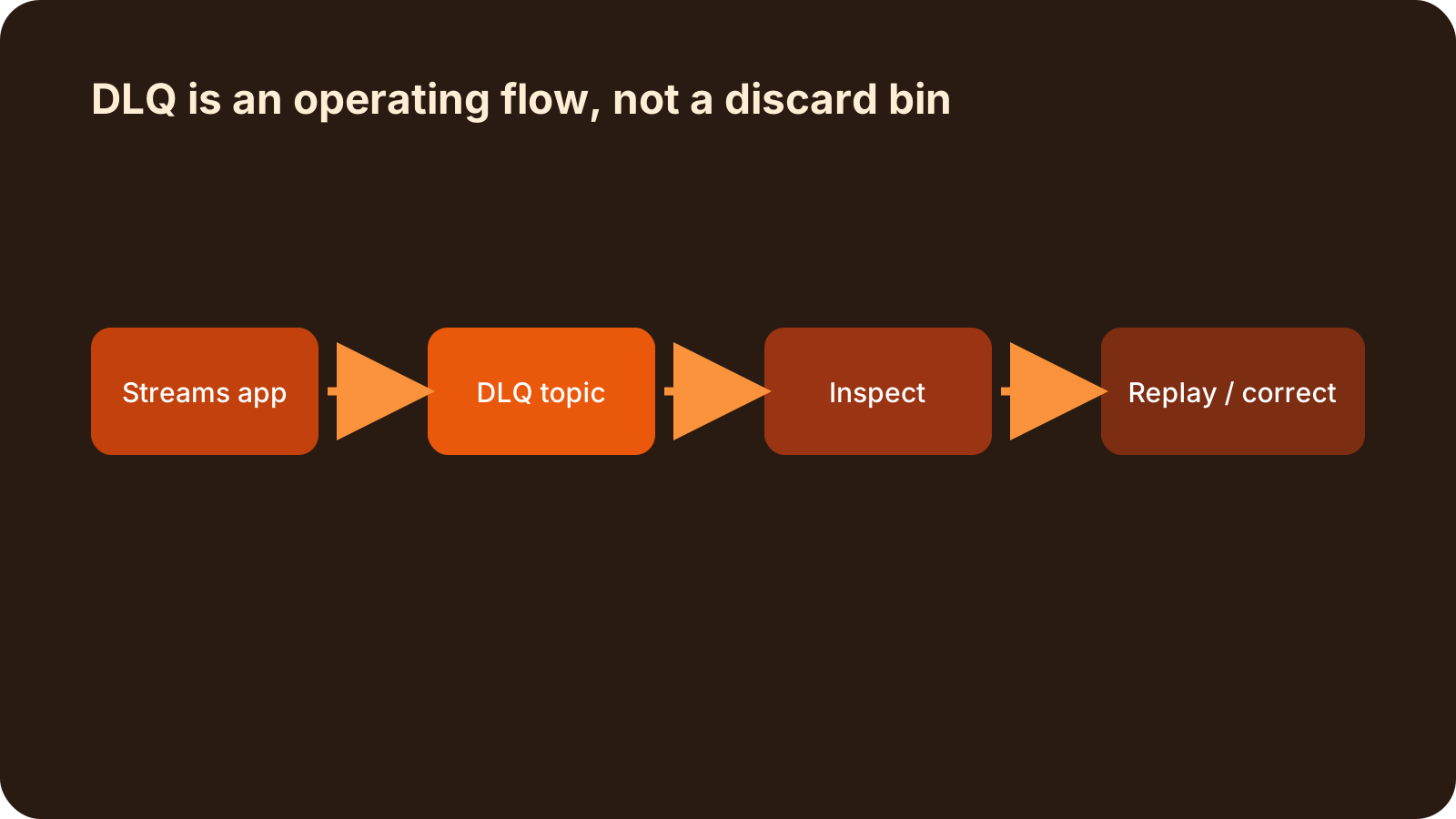
A DLQ Also Needs an Operating Flow
DLQ support helps avoid losing failed records. But once records start landing in a DLQ, that topic becomes an operational object.
input topic
  -> Kafka Streams
      -> output topic
      -> DLQ topic
            -> alert
            -> analysis
            -> replay or correction
At minimum, define these things:
| Area | What to decide |
|---|---|
| Topic design | partition count, replication factor, retention |
| Metadata | source topic, partition, offset, exception details |
| Alerting | DLQ produce count, DLQ lag, processing delay |
| Replay | replay to original topic or route through a correction topic |
| Repeat failure control | retry count, failure reason, processing status |
If the event must never be lost, DLQ is only the beginning. Someone still needs to own when and how records in the DLQ are handled.
Rebalance Is Heavier in Kafka Streams
The second change is the Streams Rebalance Protocol.
For a plain consumer group, rebalance redistributes partition ownership. That can still hurt, but Kafka Streams has more moving parts.
Kafka Streams is not only consuming partitions.
topic partition
  -> stream task
  -> state store
  -> changelog topic
  -> standby task
  -> interactive query metadata
In a stateful topology, task placement matters. There may be local RocksDB state, changelog restore, standby replicas, and warm-up tasks.
An aggregation application may look like this:
orders
  -> groupByKey()
  -> count()
  -> RocksDB state store
  -> order-counts
When this application rebalances, it is not merely changing which consumer owns a partition. Tasks may move, state may need to restore, and processing delay can grow while that happens.
That is why Kafka Streams rebalances are so visible operationally.
A simple redeploy makes lag jump.
Adding one instance triggers a long state restore.
Failure recovery overlaps with task movement.
The Streams Rebalance Protocol Moves Coordination to the Broker
Historically, Kafka Streams used the consumer group rebalance structure with Streams-specific metadata layered on top. Much of the assignment and coordination work lived on the client side.
The Streams Rebalance Protocol changes that direction.
old approach:
  Streams clients carry much of the assignment and coordination responsibility

new approach:
  the broker group coordinator manages streams group metadata
  and coordinates task assignment from the broker side
Apache Kafka documentation describes the Streams Rebalance Protocol as a broker-driven rebalancing system for Kafka Streams applications. It extends the same direction as KIP-848, which moved rebalance coordination for plain consumers from clients to brokers, into Streams workloads.
The application-side setting starts here:
group.protocol=streamsThe official Kafka Streams configuration says group.protocol supports classic and streams, and the default is classic. You need streams to use the Streams Rebalance Protocol.
The Kafka 4.3 Streams Rebalance Protocol documentation says the protocol is enabled by default on new Kafka 4.2 clusters, but both brokers and clients must run Kafka 4.2 or later. On upgraded clusters, you should also confirm the feature flag state.
bin/kafka-features.sh --bootstrap-server localhost:9092 \
  upgrade --feature streams.version=1
So there are two checks:
Does the cluster support the streams group protocol?
Does the Streams application set group.protocol=streams?
What Gets Better?
The direction is clear.
| Change | Operational meaning |
|---|---|
| Broker-driven coordination | Reduce client-side coordination differences |
| Dedicated streams group | Manage Streams-specific metadata and state separately from consumer groups |
| Broker-side assignment | Move topology and member metadata management toward the coordinator |
| Better observability | Expose streams group state and rebalance metrics more clearly |
| Group-level config | Tune some Streams group behavior without redeploying clients |
This does not mean rebalance disappears.
The better interpretation is:
Kafka Streams task and state reassignment
becomes a broker-coordinated protocol concern,
not only a client-internal behavior.
This matters most for stateful applications because state store restore and changelog traffic are directly tied to perceived downtime and lag.
But It Is Not an Immediate Switch for Every App
The line here matters too.
The Streams Rebalance Protocol is an important direction, but you need to check the current support boundary before using it.
Kafka 4.3 documentation lists several limitations:
- static membership is not supported
- significant topology updates may require a new streams group
- the high availability assignor is not supported yet; only the sticky assignor is supported
- warmup tasks and rack-aware assignment are not supported yet
- regular expression topic subscription is not supported
- online migration between the classic protocol and streams protocol is not supported
- some client-side Streams configurations are ignored and must be set as group-level configuration instead
That means existing applications should not be moved blindly.
new stateless app:
  lower risk to test first

existing stateful app:
  validate topology, state store, standby, and restore time

critical production app:
  keep classic first and run a migration test separately
A Safer Adoption Order
The two changes do not need to be adopted at the same pace.
DLQ is about what happens to failed records. For a new Kafka Streams application, it is worth considering early. But the DLQ topic, alerting, and replay flow must be designed together.
The Streams Rebalance Protocol changes the coordination model. It may bring large benefits, but support gaps and migration boundaries matter.
A practical order is:
1. Define the DLQ topic and failed-record policy.
2. Add alerts for DLQ produce count and lag.
3. Make the replay or correction process explicit, even if manual at first.
4. Enable group.protocol=streams in a test environment.
5. Compare rebalance time and restore time for stateful topologies.
6. Check whether the app uses unsupported Streams features.
7. Consider production adoption for new applications first.
The Operational View
These changes ultimately push us to treat Kafka Streams as an operating system component, not just application code.
Records in a DLQ are a signal that business event processing failed. Long or frequent rebalances may reflect interactions among Streams instances, broker group coordination, state stores, changelog topics, and host resources.
This operational angle is also central to Konduo. Konduo connects clustered resources such as Kafka through plugins so teams can read broker, topic, consumer group, metric evidence, and alert response in one operating flow. Kafka Streams applications are easier to diagnose when DLQ, lag, rebalance behavior, broker state, and host resources are read in the same context.
Summary
Kafka Streams DLQ support and the Streams Rebalance Protocol address different operational problems after Kafka 4.2.
DLQ:
  isolate failed records without losing them

Streams Rebalance Protocol:
  move task and state reassignment coordination toward the broker
DLQ is not automatic recovery. The Streams Rebalance Protocol does not erase every migration concern.
But both changes move operational burden from custom application code and scattered client behavior toward Kafka Streams standard features and protocols. If you operate Kafka Streams for the long term, these are not “someday” features. They are worth turning into an adoption policy now.
Further Reading
For more context connected to this topic, these posts are also worth reading.
- Implementing the EIP Aggregator Pattern with Kafka Streams - Shows why task and state behavior matters in stateful Kafka Streams applications.
- Kafka 4.0 Consumer Rebalance: Coordination Moves to the Broker - Explains the broker-driven rebalance shift for ordinary consumer groups.
- Reading Kafka Consumer Lag as Processing Pressure - Frames lag as processing capacity and recovery time, not just a counter.