Engineering Note
One Connection, One Table per Thread: Apache Fluss Java Client
Read and write the Flink Quickstart's Primary Key and Log Tables with the Apache Fluss 0.9.1 Java Client, starting from object lifecycles.

Once Flink SQL has created a table, the next question is how application code should use it safely. Apache Fluss Java Client has a clear rule: share one Connection for the application, then create a Table or Admin for the thread that starts a unit of work.
This article reuses demo.customer_profile and demo.order_events from the Flink Quickstart. The first keeps current state for a key; the second accumulates an event history. The Java Client does not flatten those models into one write API.
Konduo is a tool for managing, operating, and monitoring data infrastructure such as Fluss. Understanding the Java Client lifecycle helps prevent two common mistakes when application code and operations tools reach the same cluster: creating too many connections and sharing an object that must remain thread-local.
What You Will Verify
- Why
Connectionis shared whileTableandAdminare not - How to upsert a Primary Key Table with
GenericRowand read current state by key - How to append to a Log Table and subscribe with
LogScanner - When to choose the row-oriented API or the POJO-based Typed API
Start with the Quickstart Tables
First complete the Apache Fluss Flink Quickstart, which creates the demo database and these tables. This article neither recreates them nor removes their existing data.
demo.customer_profile  Primary Key Table
  customer_id     INT PRIMARY KEY
  name            STRING
  membership      STRING
  account_balance DECIMAL(15, 2)

demo.order_events      Log Table
  order_id             BIGINT
  customer_id          INT
  total_price          DECIMAL(15, 2)
  ordered_on           DATE
  order_priority       STRING
  clerk                STRING
Add fluss-client 0.9.1-incubating. The API and behavior in this article target Apache Fluss 0.9.1-incubating.
<dependency>
  <groupId>org.apache.fluss</groupId>
  <artifactId>fluss-client</artifactId>
  <version>0.9.1-incubating</version>
</dependency>
In addition to the snippets, the article provides two complete Java files and a Maven configuration. Download all three files into the same directory.
# JDK 17+ and Maven are required.
# Place all three downloaded files in the same empty directory, then run each example.
MAVEN_OPTS='--add-opens=java.base/java.nio=ALL-UNNAMED' \
  mvn compile exec:java -Dexec.mainClass=PrimaryKeyTableExample

MAVEN_OPTS='--add-opens=java.base/java.nio=ALL-UNNAMED' \
  mvn compile exec:java -Dexec.mainClass=LogTableExample
Allow Arrow Access on JDK 17+
The fluss-client write path uses Arrow memory facilities. On JDK 17 or later, an append or upsert can fail during initialization unless the JVM opens java.nio. Add this option when starting the application:
--add-opens=java.base/java.nio=ALL-UNNAMEDShare Connection, Create Table per Unit of Work
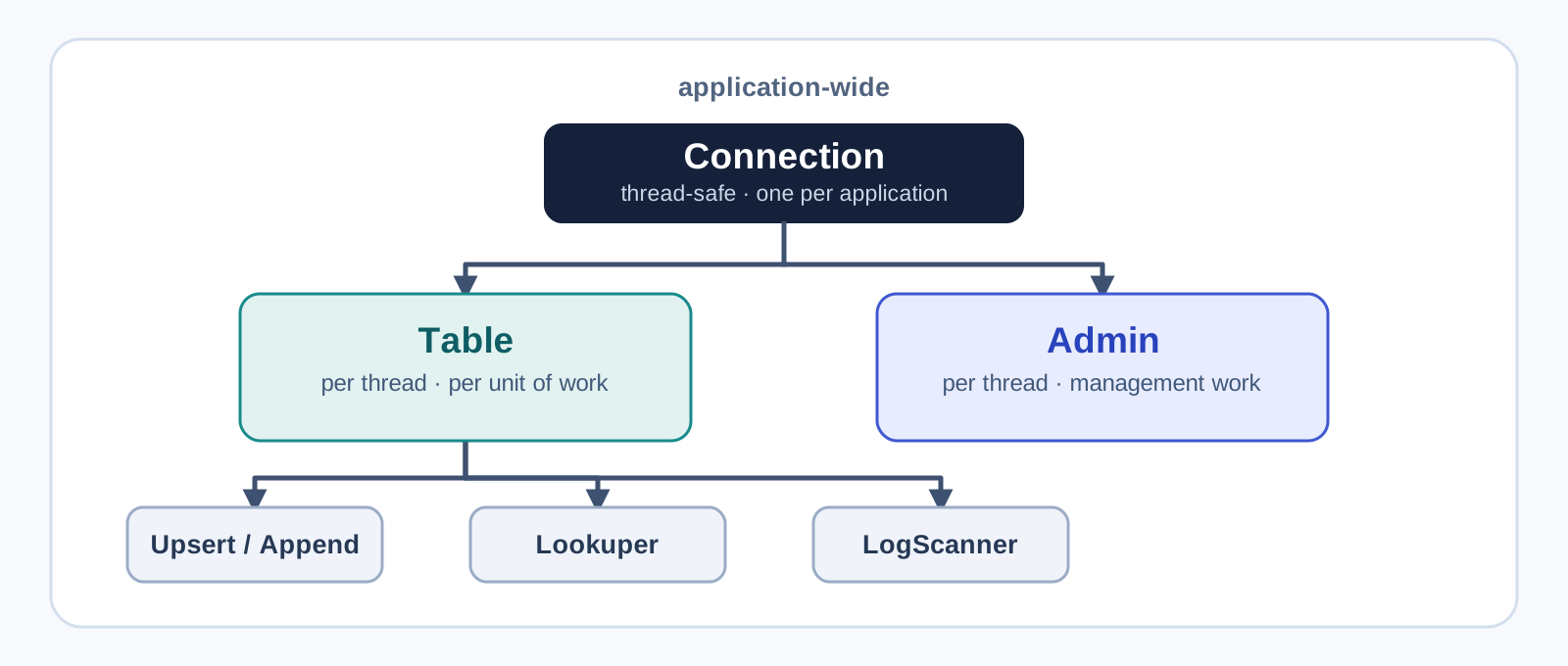
Connection is the starting point for Coordinator and TabletServer connections and client configuration. It is thread-safe, so one application-wide instance is appropriate. Table and Admin, however, are not thread-safe. Create them in the thread that needs them and close them with that work; do not cache or pool them.
Configuration config = new Configuration();
config.setString("bootstrap.servers", "localhost:9123");

// Create this once when the application starts.
Connection connection = ConnectionFactory.createConnection(config);

// Use this Table instance only from the thread running this work.
try (Table profiles = connection.getTable(
        TablePath.of("demo", "customer_profile"))) {
    System.out.println(profiles.getTableInfo());
}

// Call connection.close() when the application shuts down.
The later examples assume that this connection remains alive until application shutdown. Admin follows the same rule. Obtain it with connection.getAdmin() in the thread that manages databases or tables, rather than retaining it indefinitely. Admin methods return CompletableFuture: a short management step can wait with get(), while an asynchronous flow can use thenApply and exceptionally.
Upsert and Verify Current State with GenericRow
GenericRow is a low-level row format whose values are supplied in schema order. It is useful when the schema is known and you need precise control over conversion costs. It is not an API for arbitrary Java objects: use Fluss internal values such as BinaryString for STRING and Decimal for DECIMAL.
Update the dedicated Quickstart customer 999999 from Java. UpsertWriter can be created only for a Primary Key Table. Each run generates different amounts, then prints the value to write, the result after the first write, the fields to change for the same key, and the result after the update.
static BigDecimal randomBalanceExcept(BigDecimal previous) {
    BigDecimal amount;
    do {
        long cents = ThreadLocalRandom.current().nextLong(1_000, 100_000);
        amount = BigDecimal.valueOf(cents, 2);
    } while (amount.equals(previous));
    return amount;
}

static GenericRow profileRow(int customerId, String membership, BigDecimal balance) {
    return GenericRow.of(
        customerId,
        BinaryString.fromString("Quickstart User"),
        BinaryString.fromString(membership),
        Decimal.fromBigDecimal(balance, 15, 2)
    );
}

static void printProfile(String step, int customerId, String membership, BigDecimal balance) {
    System.out.printf("""
        %s
        {
          "customer_id": %d,
          "name": "Quickstart User",
          "membership": "%s",
          "account_balance": "%s"
        }
        %n""", step, customerId, membership, balance.toPlainString());
}

static void printProfile(String step, InternalRow row) {
    if (row == null) {
        throw new IllegalStateException("customer 999999 was not found");
    }
    printProfile(
        step,
        row.getInt(0),
        row.getString(2).toString(),
        row.getDecimal(3, 15, 2).toBigDecimal()
    );
}

int customerId = 999999;
BigDecimal beforeBalance = randomBalanceExcept(null);
BigDecimal afterBalance = randomBalanceExcept(beforeBalance);

try (Table profiles = connection.getTable(
        TablePath.of("demo", "customer_profile"))) {
    UpsertWriter writer = profiles.newUpsert().createWriter();
    Lookuper lookuper = profiles.newLookup().createLookuper();

    printProfile("[1/4] Initial value to write:", customerId, "java-client-before", beforeBalance);
    writer.upsert(profileRow(customerId, "java-client-before", beforeBalance)).get();
    writer.flush();

    printProfile("[2/4] Read the value after the first write:",
        lookuper.lookup(GenericRow.of(customerId)).get().getSingletonRow());

    System.out.printf("[3/4] Change fields for the same primary key:%n"
            + "membership=java-client-after%naccount_balance=%s%n", afterBalance);
    writer.upsert(profileRow(customerId, "java-client-after", afterBalance)).get();
    writer.flush();

    printProfile("[4/4] Read the value after the update:",
        lookuper.lookup(GenericRow.of(customerId)).get().getSingletonRow());
}
The snippet uses BigDecimal, ThreadLocalRandom, and InternalRow. upsert() returns a future, and flush() waits until preceding writes reach either server acknowledgement or an error. Both lookups print a complete JSON-shaped row, so it is immediately clear that the same customer_id changes membership and account_balance rather than adding a row.
Render the Internal Lookup Row as JSON
A Primary Key Table reads current state by key instead of scanning an event history. The lookup key is also a GenericRow. As the second printProfile overload shows, handle a null result from getSingletonRow() separately. InternalRow returns STRING as BinaryString, which is rendered with toString(), and reads DECIMAL(15, 2) with getDecimal(3, 15, 2).
LookupResult result = lookuper.lookup(GenericRow.of(customerId)).get();
printProfile("Current value:", result.getSingletonRow());
Lookuper is not thread-safe either. Create one per calling thread or serialize access instead of sharing one instance among request threads.
Append Several Log Events and Read Their Content Back
order_events has no primary key. Sending the same order_id again does not replace an existing row, so use AppendWriter, not UpsertWriter. In the low-level row format, a DATE is an int that counts days from the epoch. Queue four events in the writer, wait with one flush(), and print the JSON content before writing.
record ExampleEvent(
        long orderId, int customerId, BigDecimal totalPrice,
        LocalDate orderedOn, String priority, String clerk) {}

static GenericRow eventRow(ExampleEvent event) {
    return GenericRow.of(
        event.orderId(), event.customerId(),
        Decimal.fromBigDecimal(event.totalPrice(), 15, 2),
        (int) event.orderedOn().toEpochDay(),
        BinaryString.fromString(event.priority()),
        BinaryString.fromString(event.clerk())
    );
}

static void printEvent(String step, ExampleEvent event) {
    System.out.printf("""
        %s
        {
          "order_id": %d,
          "customer_id": %d,
          "total_price": "%s",
          "ordered_on": "%s",
          "order_priority": "%s",
          "clerk": "%s"
        }
        %n""", step, event.orderId(), event.customerId(),
        event.totalPrice().toPlainString(), event.orderedOn(), event.priority(), event.clerk());
}

long orderIdBase = System.currentTimeMillis() * 10;
List<ExampleEvent> eventsToAppend = List.of(
    new ExampleEvent(orderIdBase, 999999, new BigDecimal("42.15"), LocalDate.of(2026, 8, 1), "low", "Java Client Clerk"),
    new ExampleEvent(orderIdBase + 1, 999999, new BigDecimal("85.60"), LocalDate.of(2026, 8, 2), "medium", "Java Client Clerk"),
    new ExampleEvent(orderIdBase + 2, 999999, new BigDecimal("129.90"), LocalDate.of(2026, 8, 3), "high", "Java Client Clerk"),
    new ExampleEvent(orderIdBase + 3, 999999, new BigDecimal("24.50"), LocalDate.of(2026, 8, 4), "low", "Java Client Clerk")
);
eventsToAppend.forEach(event -> printEvent("[1/3] Event queued for append:", event));

try (Table events = connection.getTable(TablePath.of("demo", "order_events"))) {
    AppendWriter writer = events.newAppend().createWriter();
    for (ExampleEvent event : eventsToAppend) {
        writer.append(eventRow(event));
    }
    writer.flush();
}
This code uses List. In Java Client 0.9.1, AppendResult does not yet expose the stored offset. This is therefore not an example that immediately reads exactly four events back from their offsets. A consumer subscribes to each bucket from an application-managed start position, then manages business identifiers and processed positions separately.
The Quickstart’s order_events is a non-partitioned table with bucket.num = 1, so subscribe to bucket 0 from its beginning. Beginning reads also pass through existing orders, so this example finds the four order_id values it just wrote and prints each complete row as JSON. It fails after 15 seconds if it cannot find all four, rather than polling forever. A real consumer starts from a stored processed position rather than repeatedly reading from the beginning.
try (Table events = connection.getTable(TablePath.of("demo", "order_events"));
        LogScanner scanner = events.newScan().createLogScanner()) {
    scanner.subscribeFromBeginning(0);

    Set<Long> remaining = eventsToAppend.stream()
        .map(ExampleEvent::orderId)
        .collect(Collectors.toCollection(LinkedHashSet::new));
    long deadline = System.nanoTime() + Duration.ofSeconds(15).toNanos();
    while (!remaining.isEmpty() && System.nanoTime() < deadline) {
        ScanRecords records = scanner.poll(Duration.ofSeconds(1));
        for (ScanRecord record : records) {
            InternalRow row = record.getRow();
            if (remaining.remove(row.getLong(0))) {
                ExampleEvent read = new ExampleEvent(
                    row.getLong(0), row.getInt(1),
                    row.getDecimal(2, 15, 2).toBigDecimal(),
                    LocalDate.ofEpochDay(row.getInt(3)),
                    row.getString(4).toString(), row.getString(5).toString()
                );
                printEvent("[3/3] Read the appended event:", read);
            }
        }
    }
    if (!remaining.isEmpty()) {
        throw new IllegalStateException("did not read every appended event: " + remaining);
    }
}
The snippet uses Set, LinkedHashSet, and Collectors. The console prints all four input messages and the four messages read by the scanner. An identical order_id is not a Log Table deduplication mechanism; the time-based IDs in this example are only for a tutorial. For a real table with several buckets, subscribe to every bucket and persist an independent start and completion position for each. A partitioned table requires a partition ID as well, through subscribeFromBeginning(partitionId, bucket).
GenericRow or the Typed API?
The Typed API maps POJO field names and types to the table schema. It is easier to read in application code that naturally uses LocalDate, BigDecimal, and String, such as code that writes order_events.
public class OrderEvent {
    public Long order_id;
    public Integer customer_id;
    public BigDecimal total_price;
    public LocalDate ordered_on;
    public String order_priority;
    public String clerk;

    public OrderEvent() {}
}

try (Table events = connection.getTable(TablePath.of("demo", "order_events"))) {
    TypedAppendWriter<OrderEvent> writer = events.newAppend()
        .createTypedWriter(OrderEvent.class);
    OrderEvent event = new OrderEvent();
    event.order_id = 1_000_000_002L;
    event.customer_id = 999999;
    event.total_price = new BigDecimal("42.00");
    event.ordered_on = LocalDate.of(2026, 8, 1);
    event.order_priority = "java-client";
    event.clerk = "Java Client Clerk";
    writer.append(event).get();
    writer.flush();
}| Decision point | GenericRow API | POJO Typed API |
|---|---|---|
| Values | You manage field order and Fluss internal values | Java field names and types map to the schema |
| Best fit | You need close control over conversion and representation | General application code and fast exploration |
| Watch for | BinaryString, Decimal, and internal date encoding must be correct | A POJO/schema mismatch fails conversion and conversion adds work |
The Typed API converts between POJOs and internal rows for convenience. High-throughput or latency-sensitive paths can justify reviewing a lower-level API such as GenericRow, but that choice never changes the lifecycle rule: share Connection; create Table, writers, and scanners for the work that uses them.
Three Checks Before You Finish
- Share
Connectionacross the application, but do not shareTable,Admin, orLookuperacross threads. - Use
UpsertWriterand a key lookup forcustomer_profile; useAppendWriterand bucket subscription fororder_events. - Let the application own Log Table consumer positions and its deduplication rule, alongside a business identifier.
Further Reading
- Your First Apache Fluss Run: What the Flink Quickstart Shows - Creates the
demodatabase and two tables used unchanged in this article. - Reading and Writing Apache Fluss Tables from Go: fluss-go Public Beta - Lets you compare the same table models with the Go Client’s objects.
- What Is Apache Fluss? A Streaming Lakehouse Between Kafka, Flink, and Iceberg - Explains how the two table models fit into the wider data path.