Engineering Note
Reading and Writing Apache Fluss Tables from Go: fluss-go Public Beta
Use the fluss-go public beta with demo.customer_profile and demo.order_events from the Apache Fluss Flink Quickstart to update, look up, append, and scan data.
The Apache Fluss Flink Quickstart creates demo.customer_profile and demo.order_events with Flink SQL, then shows the difference between updating current state for one key and retaining an event history. This article works with those same tables directly from Go.
fluss-go is a Go client library for Apache Fluss. Its current v0.1.0-beta.10 release is a public beta that supports Apache Fluss 0.9.1-incubating only. The public beta comprises the data API fgo, the administration API fadm, and the binary protocol messages in fmsg. This article uses the data API for customer state and order events while also introducing the library’s overall layering and verification boundaries.
Konduo is a management, operations, and monitoring tool for Fluss clusters. fluss-go is the client foundation used by the Go-based Konduo Fluss plugin to read tables, buckets, and cluster state and to carry out necessary operational work. The examples in this article are a way to verify that foundation first from application code.
Start with the Quickstart Tables
Complete the table-creation and data-loading stages of the Flink Quickstart first. This article creates neither another database nor another schema. The Go program opens these two tables.
demo.customer_profile  Primary Key Table
  customer_id     INT PRIMARY KEY
  name            STRING
  membership      STRING
  account_balance DECIMAL(15, 2)

demo.order_events      Log Table
  order_id             BIGINT
  customer_id          INT
  total_price          DECIMAL(15, 2)
  ordered_on           DATE
  order_priority       STRING
  clerk                STRING
customer_profile.customer_id is an INT, so the Go value is int32. order_events.order_id is a BIGINT, so it is int64. A DECIMAL(15, 2) value is a *big.Rat, and a DATE is a time.Time. A writer returns an error before creating a request when its Go values do not match the table schema.
Before running the code, use go version to check your Go release. You need Go 1.25.12 or newer in the 1.25 series, or Go 1.26.5 or newer in the 1.26 series. Also confirm that the two tables created by the Quickstart match the schemas shown above.
All code below uses these imports.
import (
    "context"
    "encoding/json"
    "errors"
    "fmt"
    "log"
    "math/big"
    "math/rand/v2"
    "time"

    "github.com/pletorco/fluss-go/pkg/fgo"
)
You can also download complete, runnable files. After starting the Quickstart, create an empty Go module and download the dependency. The default Coordinator address is localhost:9123; set FLUSS_BOOTSTRAP for another address.
mkdir fluss-go-example && cd fluss-go-example
go mod init fluss-go-example
go get github.com/pletorco/fluss-go/pkg/fgo@v0.1.0-beta.10

# Go 1.25.12 or newer in the 1.25 series, or Go 1.26.5 or newer in the 1.26 series, is required.
# Place the downloaded files in this directory, then run them.
go run primary-key-table.go
go run log-table.go

# When the Coordinator uses another address
FLUSS_BOOTSTRAP=fluss.example:9123 go run primary-key-table.go
The Public Beta Client Layers
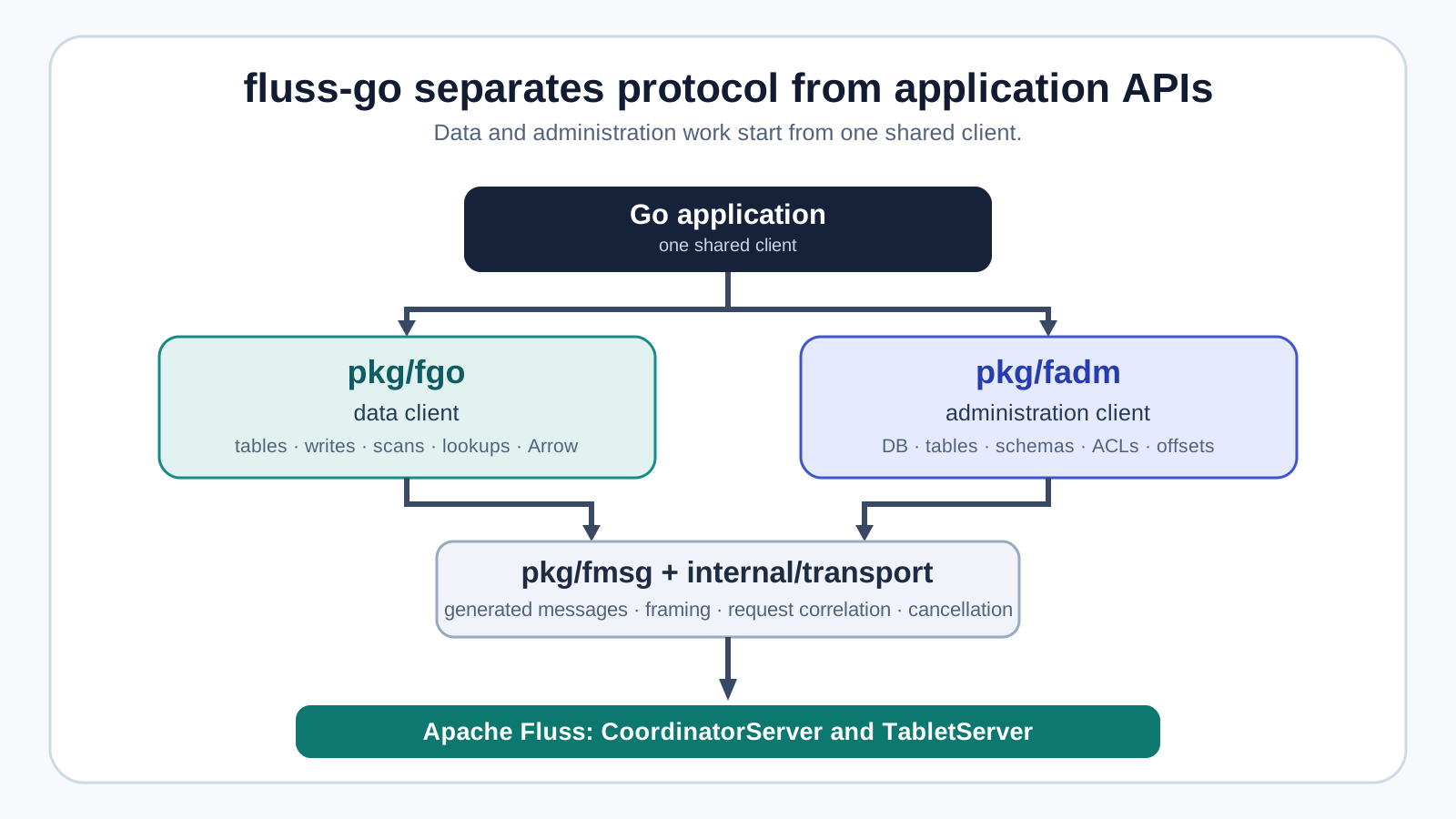
At the center of the public beta, fgo.Client manages Coordinator and TabletServer connections, version negotiation, authentication, metadata, and bucket routing. The data API fgo and the administration API fadm share that connection foundation. Beta.10 renames the experimental public API around Apache Fluss terminology and provides no compatibility aliases for the former names. The code below uses the beta.10 names to load the two tables. The beta.9 behavior that keeps the logical fgo.Client open when a managed Coordinator connection is replaced continues unchanged.
ctx := context.Background()

client, err := fgo.Open(
    ctx,
    fgo.WithBootstrapServers("coordinator.example:9123"),
    fgo.WithClientSoftware("quickstart-go", "0.1.0"),
)
if err != nil {
    log.Fatal(err)
}
defer client.Close()

profiles, err := client.GetTable(ctx, fgo.TablePath{
    Database: "demo",
    Table:    "customer_profile",
})
if err != nil {
    log.Fatal(err)
}

events, err := client.GetTable(ctx, fgo.TablePath{
    Database: "demo",
    Table:    "order_events",
})
if err != nil {
    log.Fatal(err)
}
GetTable does not return a name-only handle. It loads authoritative table and schema metadata from the server, including the information needed for bucket routing. If the Quickstart table schema changes, load the table again until the new schema is visible and create new readers and writers from that handle.
Primary Key Table: Update and Look Up the Quickstart Customer
The Quickstart uses the dedicated customer key 999999 to show that a second INSERT for the same key changes current state. This example first writes and reads go-client-before, then upserts and reads go-client-after for the same key. The console therefore shows the state change regardless of a previous run. Its table has no table.merge-engine, so do not set MergeModeOverwrite; use the default merge mode instead.
lookup, err := client.NewLookuper(
    ctx,
    profiles,
    fgo.WithLookupBatchLimits(100, 4),
)
if err != nil {
    log.Fatal(err)
}
defer lookup.Close()

writer, err := client.NewUpsertWriter(ctx, profiles, fgo.WithUpsertBatchLimits(1<<20, 500))
if err != nil {
    log.Fatal(err)
}
defer writer.Close(ctx)

type customerProfile struct {
    CustomerID  int32  `json:"customer_id"`
    Name        string `json:"name"`
    Membership  string `json:"membership"`
    AccountBalance string `json:"account_balance"` // Keep decimals exact in JSON output.
}

writeProfile := func(profile customerProfile) {
    accountBalance, ok := new(big.Rat).SetString(profile.AccountBalance)
    if !ok {
        log.Fatalf("invalid account_balance: %q", profile.AccountBalance)
    }
    result := writer.Upsert(ctx, fgo.Row{
        profile.CustomerID, profile.Name, profile.Membership, accountBalance,
    }).Await(ctx)
    if result.Err != nil {
        log.Fatal(result.Err)
    }
    if err := writer.Flush(ctx); err != nil {
        log.Fatal(err)
    }
}
showProfile := func(step string) {
    result := lookup.Lookup(ctx, fgo.PrimaryKey{int32(999999)})[0]
    if errors.Is(result.Err, fgo.ErrNotFound) {
        log.Printf("%s customer was not found", step)
    } else if result.Err != nil {
        log.Fatal(result.Err)
    } else {
        printJSON(step, profileFromRow(result.Row))
    }
}

before := customerProfile{int32(999999), "Quickstart User", "go-client-before", randomAmount("")}
after := before
after.Membership = "go-client-after"
after.AccountBalance = randomAmount(before.AccountBalance)

printJSON("[1/4] Initial value to write:", before)
writeProfile(before)
showProfile("[2/4] Read the value after the first write:")
log.Printf("[3/4] Change fields for the same primary key:\nmembership=%s\naccount_balance=%s", after.Membership, after.AccountBalance)
writeProfile(after)
showProfile("[4/4] Read the value after the update:")
func randomAmount(except string) string {
for {
cents := 1_000 + rand.IntN(99_000) // 10.00 through 999.99
amount := fmt.Sprintf("%d.%02d", cents/100, cents%100)
if amount != except {
return amount
}
}
}func profileFromRow(row fgo.Row) customerProfile {
accountBalance, ok := row[3].(*big.Rat)
if !ok {
log.Fatalf("unexpected account_balance type: %T", row[3])
}
return customerProfile{
CustomerID: row[0].(int32), Name: row[1].(string),
Membership: row[2].(string), AccountBalance: accountBalance.FloatString(2),
}
}
func printJSON(step string, value customerProfile) {
encoded, err := json.MarshalIndent(value, "", " ")
if err != nil {
log.Fatal(err)
}
log.Printf("%s\n%s", step, encoded)
}Step 1 prints the input before it is written. randomAmount generates two different amounts between 10.00 and 999.99 for every run, so the second upsert changes both membership and account_balance. profileFromRow converts the returned row to the JSON structure above, and printJSON formats it for the console. account_balance is rendered as a string so the display retains decimal precision. Lookuper routes by key and bucket rather than scanning every profile. Running the program prints the state transition explicitly.
[1/4] Initial value to write:
{
  "customer_id": 999999,
  "name": "Quickstart User",
  "membership": "go-client-before",
  "account_balance": "418.27"
}
[2/4] Read the value after the first write:
{
  "customer_id": 999999,
  "name": "Quickstart User",
  "membership": "go-client-before",
  "account_balance": "418.27"
}
[3/4] Change fields for the same primary key:
membership=go-client-after
account_balance=762.94
[4/4] Read the value after the update:
{
  "customer_id": 999999,
  "name": "Quickstart User",
  "membership": "go-client-after",
  "account_balance": "762.94"
}
Both reads use the same key while membership and account_balance change. Repeating Upsert for the same customer_id changes current state rather than adding a row.
Lookup can take several keys and batch the physical requests by bucket. Results retain their association with the input keys, so a missing key and a server or transport error stay distinguishable. ErrNotFound can be an ordinary data result; a timeout cannot.
Log Table: Append and Read Back Four Order Events
order_events has no primary key. Recording more events for customer 999999 therefore uses an AppendWriter, not an UpsertWriter. This example leaves the Quickstart rows unchanged, queues four new order events together, and prints their JSON content.
appendWriter, err := client.NewAppendWriter(
    ctx,
    events,
    fgo.WithAppendBatchLimits(1<<20, 500),
    fgo.WithAppendBatchTimeout(5*time.Millisecond),
)
if err != nil {
    log.Fatal(err)
}
defer appendWriter.Close(ctx)

orderIDBase := time.Now().UnixNano()
eventsToAppend := []orderEvent{
    {orderIDBase, 999999, "42.15", "2026-08-01", "low", "Go Client Clerk"},
    {orderIDBase + 1, 999999, "85.60", "2026-08-02", "medium", "Go Client Clerk"},
    {orderIDBase + 2, 999999, "129.90", "2026-08-03", "high", "Go Client Clerk"},
    {orderIDBase + 3, 999999, "24.50", "2026-08-04", "low", "Go Client Clerk"},
}
printJSON("[1/3] Queue these four new events:", eventsToAppend)

futures := make([]*fgo.WriteFuture, len(eventsToAppend))
for i, event := range eventsToAppend {
    futures[i] = appendWriter.Append(ctx, event.row())
}
if err := appendWriter.Flush(ctx); err != nil {
    log.Fatal(err)
}

results := make([]fgo.WriteResult, len(futures))
for i, future := range futures {
    results[i] = future.Await(ctx)
    if results[i].Err != nil {
        log.Fatal(results[i].Err)
    }
    if !results[i].OffsetKnown {
        log.Fatal("append succeeded but did not return an offset")
    }
}
first := results[0]
for i, result := range results {
    expectedOffset := first.BaseOffset + int64(i)
    if result.Bucket != first.Bucket || result.BaseOffset != expectedOffset {
        log.Fatalf("events do not occupy one contiguous range")
    }
}
log.Printf("[2/3] Fluss stored four events in bucket=%d at offsets %d through %d", first.Bucket, first.BaseOffset, results[len(results)-1].BaseOffset)
The four Append calls enter the writer before waiting for completion, then one Flush waits for them. The Quickstart has one bucket, so the events retain their order. The example checks that all four results occupy a contiguous bucket-offset range, then sets that range’s exclusive end as the scanner’s stopping offset. It therefore does not mistake an interleaved event for one of its own. Only a successful append with a known offset lets BaseOffset confirm where an event was stored. Repeating the code with the same order_id or customer_id does not replace an existing Log Table row; it appends another four rows. An application that must prevent duplication still needs a stable event ID and an idempotency rule at the appropriate consumer boundary.
Read Back the Four Events and Verify Their Content
The Quickstart creates order_events with bucket.num = 1. Reading four rows from the BaseOffset returned by the first Append therefore verifies the group just written.
scanner, err := client.NewLogScanner(
    ctx,
    events,
    fgo.AtOffset(first.BaseOffset),
    fgo.WithScanRowLimit(int64(len(eventsToAppend))),
    fgo.WithScanStoppingOffsets(map[int32]int64{
        first.Bucket: results[len(results)-1].BaseOffset + 1,
    }),
)
if err != nil {
    log.Fatal(err)
}
defer scanner.Close()

readEvents := make([]orderEvent, 0, len(eventsToAppend))
for !scanner.Done() {
    batch, err := scanner.Poll(ctx)
    if err != nil {
        log.Fatal(err)
    }
    for _, record := range batch.Records {
        readEvents = append(readEvents, orderEventFromRow(record.Record.Value))
    }
    batch.Release()
}
if len(readEvents) != len(eventsToAppend) {
    log.Fatalf("read %d events, want %d", len(readEvents), len(eventsToAppend))
}
printJSON("[3/3] Read the appended events:", readEvents)orderEvent, event.row, orderEventFromRow, and printJSON are included in the downloadable example. total_price is rendered as a string in JSON to retain decimal precision. The input four events and the four events read back have the same shape, making it possible to verify the actual message content.
[1/3] Queue these four new events:
[
  {"order_id": 1760000000000000000, "customer_id": 999999, "total_price": "42.15", "ordered_on": "2026-08-01", "order_priority": "low", "clerk": "Go Client Clerk"},
  {"order_id": 1760000000000000001, "customer_id": 999999, "total_price": "85.60", "ordered_on": "2026-08-02", "order_priority": "medium", "clerk": "Go Client Clerk"},
  {"order_id": 1760000000000000002, "customer_id": 999999, "total_price": "129.90", "ordered_on": "2026-08-03", "order_priority": "high", "clerk": "Go Client Clerk"},
  {"order_id": 1760000000000000003, "customer_id": 999999, "total_price": "24.50", "ordered_on": "2026-08-04", "order_priority": "low", "clerk": "Go Client Clerk"}
]
[2/3] Fluss stored four events in bucket=0 at offsets 100 through 103
[3/3] Read the appended events:
[
  {"order_id": 1760000000000000000, "customer_id": 999999, "total_price": "42.15", "ordered_on": "2026-08-01", "order_priority": "low", "clerk": "Go Client Clerk"},
  {"order_id": 1760000000000000001, "customer_id": 999999, "total_price": "85.60", "ordered_on": "2026-08-02", "order_priority": "medium", "clerk": "Go Client Clerk"},
  {"order_id": 1760000000000000002, "customer_id": 999999, "total_price": "129.90", "ordered_on": "2026-08-03", "order_priority": "high", "clerk": "Go Client Clerk"},
  {"order_id": 1760000000000000003, "customer_id": 999999, "total_price": "24.50", "ordered_on": "2026-08-04", "order_priority": "low", "clerk": "Go Client Clerk"}
]
AtOffset starts at and includes the given offset. A real application can choose Earliest(), Latest(), a timestamp, or explicit offsets instead. A table with several buckets needs separately managed start and stopping offsets for each bucket. Poll can wait for records, so every call needs a cancellable context.Context. In beta.9, a response limited by bytes can end with an incomplete trailing record batch. The scanner retains the preceding complete row and Arrow batches, then resumes the next fetch at the last complete offset rather than rejecting a valid response as malformed.
The Difference Is Visible in the Same Quickstart Tables
Flink SQL and Go APIs address the same Fluss objects. The table model, however, changes what the caller confirms.
| Operation | customer_profile Primary Key Table | order_events Log Table |
|---|---|---|
| Write | upsert or delete by customer_id | append a new order event |
| Read | key or key-prefix lookup; current-state scan | sequential scan through bucket offsets |
| Success evidence | latest row for a key or mutation result | written bucket and offset |
| Repeated run | updates the current value for the key | adds one history row |
fluss-go intentionally does not flatten those models into one Put and Get API. Following Fluss’s table model in the client API reduces the chance of applying the wrong read or retry rule.
Do Not Automatically Resend an Ambiguous Write
Missing a successful write response does not prove that the server rejected it. After a network error or caller cancellation, the server may have applied the request while the client lost only the response.
fluss-go can retry safe reads within defined bounds. It does not automatically resend an ambiguous write. The affected bucket writer returns ErrWriterState; the caller needs to reconcile the earlier batch, then create a new writer or use an application-specific confirmation path that fits its idempotency contract.
Flush(ctx) waits for every write accepted before the call to reach a terminal outcome. Close(ctx) flushes pending work before releasing resources. Without a clear lifecycle, an application can lose buffered events during shutdown or record an ambiguous outcome as success. In beta.9, fgo.Client.Close() is explicitly terminal and idempotent. Close the Client only after its tables, readers, and writers have finished.
Implementation and Verification Boundaries of the Public Beta
The examples are only the start of a client contract. The fluss-go public beta verifies its 0.9.1 compatibility as follows.
pkg/fmsgmessages are generated from Fluss 0.9.1FlussApi.proto,ApiKeys.java, andErrors.java. SHA-256 records make upstream-input changes reviewable.- Java-compatible byte fixtures cover frames, row, KV, log, and Arrow batches, plus bucket hashing.
- A digest-pinned official Fluss 0.9.1 image exercises plaintext, SASL PLAIN, table administration, append and scan, KV and lookup, and Coordinator connection replacement.
- Unit and live compatibility coverage exercises byte-limited fetches that truncate row and Arrow batches at the trailing edge.
- Bounded reliability runs check acknowledged results and resource limits through cancellation, truncated connections, and TabletServer restart.
This is not a Fluss server benchmark, and it does not promise later Fluss versions or every cloud-storage combination. v0.1.0-beta.10 remains a public beta before v1. Upgrading from beta.9 requires renamed public API calls, so review the official migration table first. Pin the reviewed module tag—not latest—and confirm that the server is 0.9.1-incubating. When using an optional adapter module, pin both it and the root module to beta.10.
go get github.com/pletorco/fluss-go/pkg/fgo@v0.1.0-beta.10Two Checks Before You Finish the Tutorial
- Use
UpsertWriterandLookuperfor a Primary Key Table, andAppendWriterandLogScannerfor a Log Table. - Do not automatically resend an ambiguous write. Reconcile it first with a business identifier such as
event_idand an appropriate lookup path.
Further Reading
- Your First Apache Fluss Run: What the Flink Quickstart Shows - Creates the
demodatabase and two tables that this article uses directly. - What Is Apache Fluss? A Streaming Lakehouse Between Kafka, Flink, and Iceberg - Places Log Tables and Primary Key Tables in the wider data path.
- Why Kafka Transactions Cannot Include Your Database: KIP-939 and 2PC Participation - Examines ambiguous write results and retry responsibility through the broader lens of transaction boundaries.