Engineering Note
Can Confluent Clients Use Apicurio? Schema Compatibility and Event Integration
Connect Confluent and native Apicurio Avro serializers and deserializers, understand wire compatibility, and verify schema ID migration with a Java and Avro example.
Using the Confluent Avro Serializer (KafkaAvroSerializer) does not require Confluent Schema Registry as the server. Apicurio provides a compatible REST API that lets applications keep their existing client libraries. Connecting a new application, however, is different from replacing a registry that already serves retained events.
This post uses Java and Avro to explain the integration, then separates REST compatibility, message encoding, and feature support. The examples use the payload-prefix schema ID format and the /apis/ccompat/v7 endpoint.

Decide whether to keep the existing client libraries
Both paths connect to the same Apicurio Registry server, but use different libraries and APIs.
| Situation | Integration to consider |
|---|---|
| Keep existing Confluent Avro serializers and deserializers | Connect to the Confluent-compatible API. |
| Use Apicurio group/artifact resolution and registration settings | Use the native Apicurio Avro libraries. |
For an existing Confluent Avro application, checking the required operations through the compatibility API usually involves fewer changes. A new application does not automatically need the native path. Consider language support, available libraries, and the tools around the application.
Two independent connections
The producer sends event bytes to Kafka. The consumer reads them from Kafka. In this Avro example, the Confluent Avro Serializer registers or resolves schemas over HTTP, and the Confluent Avro Deserializer (KafkaAvroDeserializer) resolves the schema ID stored in each message. Registry is not an intermediary through which Kafka events travel.
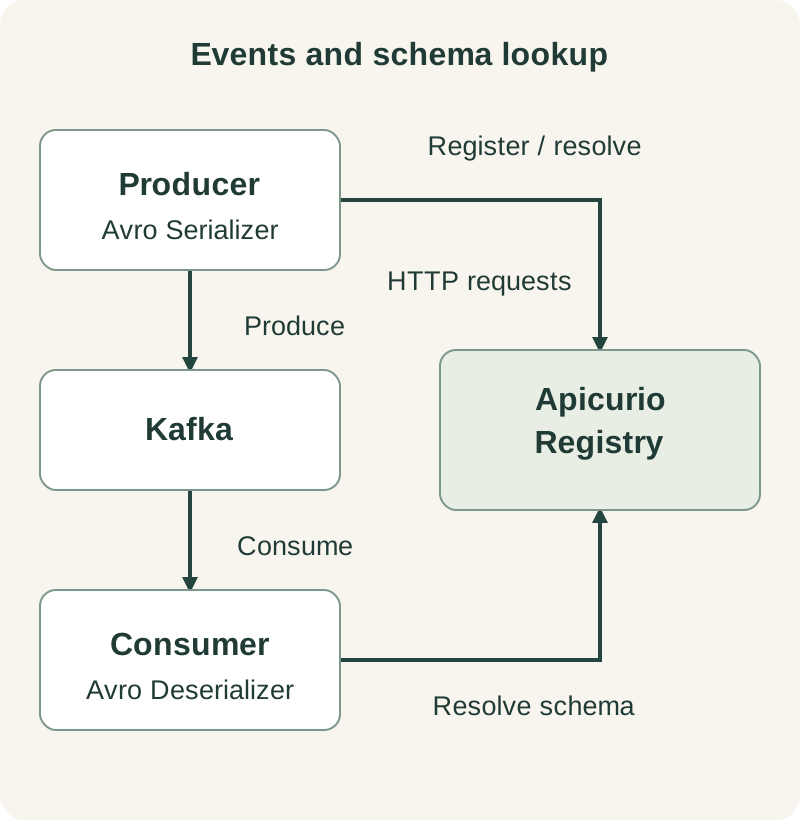
Clients cache schema information, so Registry is not called for every record. An unfamiliar schema ID or a new schema can still require a request. Restarting a client with an empty cache makes this dependency especially visible. Confluent client behavior
What changes in the client configuration?
These settings match the downloadable example. kafka:9092 and registry:8080 are Docker Compose service addresses, not host endpoints. Both paths use Kafka’s StringSerializer and StringDeserializer for keys and Avro for values.
Confluent Avro libraries: use the compatibility API
Use io.confluent:kafka-avro-serializer. Both producer and consumer point schema.registry.url to the compatibility endpoint.
Key producer settings:
bootstrap.servers=kafka:9092
schema.registry.url=http://registry:8080/apis/ccompat/v7
value.serializer=io.confluent.kafka.serializers.KafkaAvroSerializer
auto.register.schemas=true
Key consumer settings:
bootstrap.servers=kafka:9092
schema.registry.url=http://registry:8080/apis/ccompat/v7
value.deserializer=io.confluent.kafka.serializers.KafkaAvroDeserializer
specific.avro.reader=false
In Confluent Schema Registry, a subject names the scope for schema versions and compatibility policy. The default TopicNameStrategy appends -key or -value to the topic name. For the example’s orders-confluent topic, the value schema is registered under orders-confluent-value.
The Avro serializer registers or resolves the schema and writes its ID into the message. The Avro deserializer resolves the writer schema by that ID and returns a GenericRecord. Confluent Avro libraries
Apicurio Avro libraries: use the native API
Use io.apicurio:apicurio-registry-avro-serde-kafka. Set the native API endpoint through apicurio.registry.url and use Apicurio’s own resolution and registration properties.
Key producer settings:
bootstrap.servers=kafka:9092
apicurio.registry.url=http://registry:8080/apis/registry/v3
value.serializer=io.apicurio.registry.serde.avro.AvroKafkaSerializer
apicurio.registry.auto-register=true
apicurio.registry.artifact.group-id=default
apicurio.registry.artifact.artifact-id=orders-apicurio-value
Key consumer settings:
bootstrap.servers=kafka:9092
apicurio.registry.url=http://registry:8080/apis/registry/v3
value.deserializer=io.apicurio.registry.serde.avro.AvroKafkaDeserializer
Apicurio organizes schemas as artifacts within groups. The example explicitly selects the orders-apicurio-value artifact in the default group for the orders-apicurio topic. The consumer resolves schemas by the ID in each message and does not need the producer’s registration settings. Apicurio 3.3.x configuration reference
The two paths use different property names and schema resolution mechanisms. Changing the library while retaining only schema.registry.url or auto.register.schemas will not configure native Apicurio integration.
What we checked
| Component | Version used |
|---|---|
| Kafka server / Java client | 4.2.0 / 3.9.0 |
| Apicurio Registry | 3.3.3 (pletorco/apicurio-registry:3.3.3-pletor.2) |
| Confluent / Apicurio Avro libraries | 7.9.0 / 3.3.3 |
| Avro / Java / Maven | 1.12.0 / 21 / 3.9.9 |
Each producer sent a unique order ID and amount, and its consumer checked that both values matched. Every run used a new client process to avoid relying on a previous schema cache.
| Check | Result |
|---|---|
| Confluent Avro event round trip | Order ID and amount matched; clean exit |
| Native Apicurio Avro event round trip | Order ID and amount matched; clean exit |
| Lookup by schema ID through the compatibility API | HTTP 200 |
Field addition with a default under BACKWARD | Compatible |
Change amount from long to string | Incompatible; registration returned HTTP 409 |
The example ZIP contains the full source, pinned Maven build, and run/cleanup commands. Running each path through Docker Compose prints ROUND_TRIP_OK and the event values. The first run downloads dependencies.
Registry uses temporary H2 storage with authentication and TLS disabled. These checks establish Avro round trips with the same provider’s library on both sides. They do not establish mixed-library interoperability, migration of an existing registry, KafkaSQL durability, or Operator deployment. The server/client versions above are a tested combination, not a requirement that their versions match.
Three compatibility boundaries
Successful event round trips do not establish support for every Confluent feature. Check compatibility across three separate areas.
| Boundary | Question |
|---|---|
| REST API | Are registration, lookup, and compatibility operations supported? |
| Message encoding | Do identifier placement, size, meaning, and payload encoding agree? |
| Features and policy | Are authentication, references, subject strategies, and additional features supported? |
The Apicurio 3.3.x compatibility documentation describes the endpoints and supported operations. Pin the actual server patch and client versions and verify the APIs your application uses.
Schema Linking/exporters, KEK/DEK APIs, and Confluent Data Contracts rule execution are not interchangeable with basic schema registration. Accepting a ruleSet field does not establish that its rules execute. Schema evolution compatibility is also a separate question from compatibility between registry products.
Avro payload compatibility is not enough
The traditional Confluent Avro format is:
[0: 1 byte][schema ID: 4 bytes, big-endian][Avro payload]Matching Avro payloads do not help if the identifier is interpreted differently. Protobuf adds message indexes. Newer Confluent clients also support header-based GUID identification, so this payload-prefix example does not establish compatibility for every version and format. Confluent wire format
Suppose a schema had ID 42 in the old registry but receives ID 107 in the new one. Retained messages still contain 42. After changing the URL, consumers request 42 from the new registry and may find no schema or a different schema. Registry migration must verify ID mappings, references, and version history.
Test the oldest retained events, multiple schema versions, dead-letter topics, and replay topics. Restart consumers to ensure successful reads are not merely relying on a warm cache.
Decide how schemas enter production
The example enables automatic registration so the check covers schema registration as well as producing and consuming an event. Teams that need deployment-time control can register schemas through CI/CD and disable runtime registration:
For the Confluent Avro Serializer, disable registration with:
auto.register.schemas=falseThe schema must already be resolvable under the expected subject. By default, the serializer looks up the record’s schema; disabling registration does not automatically select the latest version. Align naming strategies and set compatibility policy explicitly.
For Avro, adding a field with a default and changing a field’s type can have different compatibility outcomes. BACKWARD means a new reader schema can read data written with the previous writer schema. Consider transitive checks when consumers must read multiple historical versions. Registration checks do not validate business constraints such as nonnegative amounts or prove consumer code works correctly.
Observe Registry as an operating dependency
Apicurio has its own Operator. KafkaSQL connects Registry to a Kafka cluster; a PostgreSQL storage configuration connects it to a database. Client integration does not depend on which tool manages Kafka. Operator deployment
At Pletor, we develop and publish pletorco/apicurio-registry, extending the official application image with our node metrics agent and JMX Exporter. It exposes process, cgroup, and filesystem signals as Prometheus metrics at port 9404, path /metrics, while retaining the upstream Operator and UI. Prometheus discovery must be configured separately. Client compatibility remains a property of the underlying Apicurio version and serializer/deserializer configuration.
These signals help relate Registry errors to resource pressure. Konduo connects infrastructure status, metric and log evidence, and alert response in one operations workflow. Looking at Registry request failures alongside Kafka status helps narrow client connectivity and storage problems.
What establishes a working integration?
- Record server and serializer/deserializer library versions and the selected API endpoint.
- Read historical events with an empty schema cache.
- Verify subject strategies, schema ID mappings, and references.
- Set evolution and registration policies explicitly.
- Configure Kafka and Registry authentication and TLS independently.
- Check support for every Confluent feature the application uses.
- Define handling for Registry outages, schema lookup failures, and deserialization errors.
Further Reading
- JVM Metrics Alone Cannot Explain a Container — Explore the runtime signals added by the Pletor image.
- Can Kafka Client Metrics Really Close the Observability Gap? — Examine what client telemetry can and cannot reveal.