Engineering Note
From Env to Config: The Last Mile of Container Configuration
A practical gomplate pattern for turning container environment variables into the configuration files applications actually read.
There are many ways to inject configuration into a container. You can bake files into the image, pass command arguments to docker run, provide environment variables, or mount files. In Kubernetes, ConfigMaps and Secrets can become either volumes or environment variables.
But many applications eventually want this:
zoo.cfg
nginx.conf
application.yaml
prometheus.yml
The input may be an environment variable, a volume, or a command argument. The final consumer is often a configuration file. If that last mile is handled by a growing shell script, the entrypoint becomes hard to maintain and every new configuration key can require another code change.
This post turns my OpenInfra Community Day Korea 2023 talk, “How to Inject Initial Configuration into Containers Effectively,” into a practical pattern. The main tool is gomplate.

The short version
When generating configuration files inside containers, start with these rules:
- Separate the container input mechanism from the configuration file format.
- Define an environment variable naming convention and a config-key transformation rule.
- Decide whether every key should be listed explicitly or collected by prefix.
- If keys are collected automatically, use an allowlist or blacklist.
- Check where secrets appear in rendered files and startup logs.
In one sentence:
Environment variables are a delivery mechanism.
Configuration files are the contract the application reads.
Container configuration usually collapses into a few shapes
The configuration options look different, but at runtime they usually collapse into a few forms.
| Method | Benefit | Limit |
|---|---|---|
| bake into image | simplest | hard to vary per environment |
| command argument | explicit at runtime | noisy when settings grow |
| environment variable | easy in Docker and Kubernetes | weak for nested or rich config formats |
| volume mount | provides the actual file | file management can become complex |
| ConfigMap or Secret | fits Kubernetes well | still becomes env or volume at runtime |
Environment variables are especially common. The problem appears when the application does not read environment variables directly and instead expects a file.
Direct mapping gets tiring
Imagine a Zookeeper-style configuration.
ZOO_TICK_TIME=2000
ZOO_INIT_LIMIT=5
ZOO_SYNC_LIMIT=2
ZOO_DATA_DIR=/data
ZOO_DATA_LOG_DIR=/datalog
The configuration file expects different keys.
tickTime=2000
initLimit=5
syncLimit=2
dataDir=/data
dataLogDir=/datalog
The simplest template lists each mapping directly.
tickTime={{ .Env.ZOO_TICK_TIME }}
initLimit={{ .Env.ZOO_INIT_LIMIT }}
syncLimit={{ .Env.ZOO_SYNC_LIMIT }}
dataDir={{ .Env.ZOO_DATA_DIR }}
dataLogDir={{ .Env.ZOO_DATA_LOG_DIR }}
This is clear. If the configuration surface is small and stable, it may be enough. But it becomes tedious when settings grow, new keys are added, and each application has a different key naming rule.
Put gomplate in the entrypoint
gomplate is a Go-template-based renderer. It can read environment variables and datasources such as JSON, YAML, Vault, and Consul. If you have written Helm charts, much of the syntax will feel familiar.
In a container entrypoint, the flow can be simple:
gomplate -f /templates/zoo.cfg.tmpl -o /conf/zoo.cfg
exec zkServer.sh start-foreground
For direct mappings, that may be all you need. This post goes one step further: collect environment variables by prefix and render them into a config file without listing every key in the template.
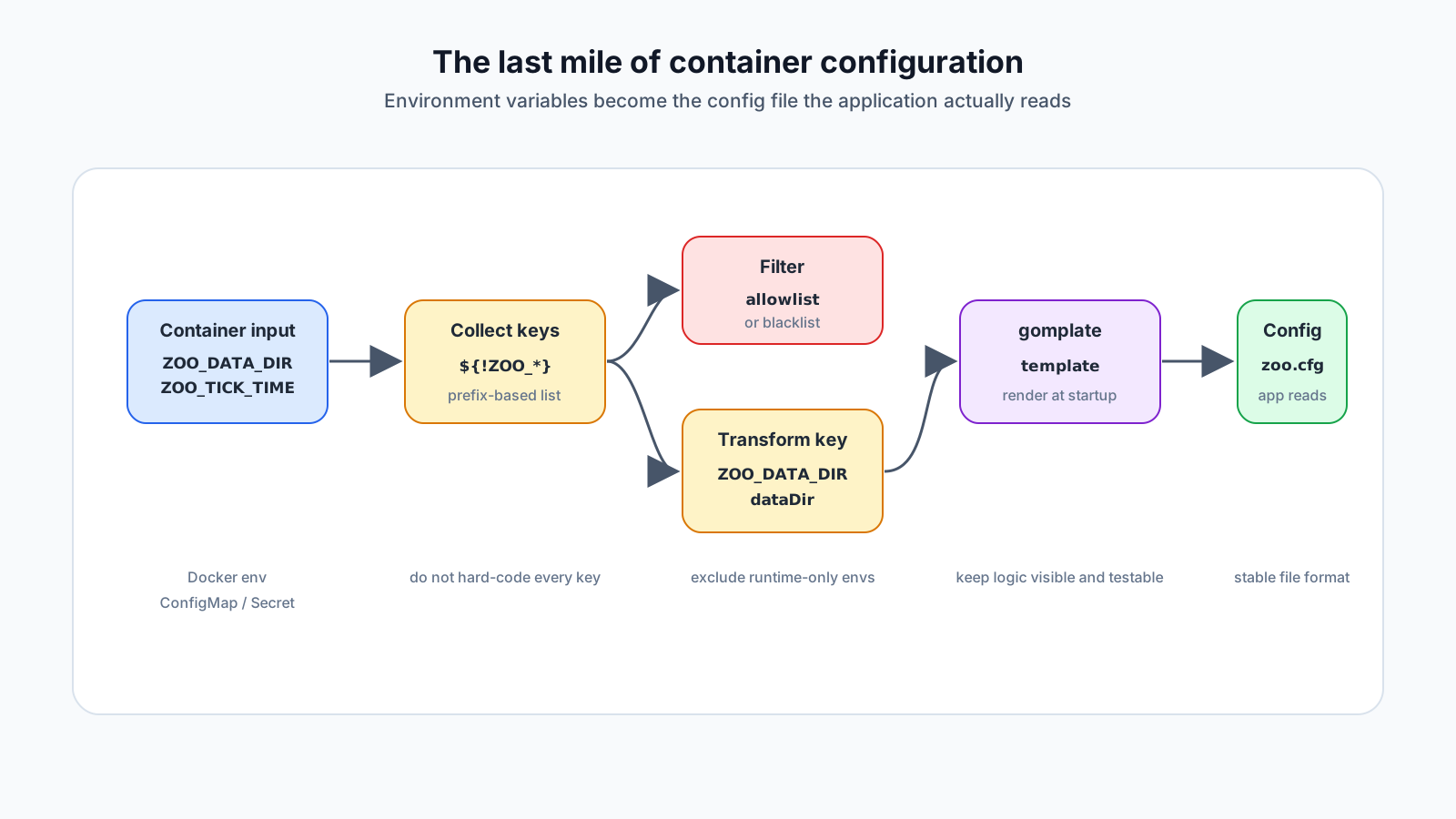
Collect keys by prefix
Bash can expand variable names that start with a prefix.
echo ${!ZOO_*}This gives you the names of shell variables beginning with ZOO_. You can pass that list to gomplate as a datasource and iterate over it in the template.
echo ${!ZOO_*} | gomplate \
  -d config=stdin: \
  -f /templates/zoo.cfg.tmpl \
  -o /conf/zoo.cfg
The template can read the stdin datasource and split it into keys.
{{ $config := datasource "config" }}
{{ $envs := strings.Split " " $config }}
{{ range $key := $envs -}}
{{ $value := env.Getenv $key }}
{{ $key }}={{ $value }}
{{ end }}
This is not yet the desired config file. It would still produce ZOO_DATA_DIR=/data. The next step is key transformation.
Make key transformation explicit
Container environment variable names and config file keys usually follow different conventions.
ZOO_DATA_DIR      -> dataDir
ZOO_DATA_LOG_DIR  -> dataLogDir
ZOO_TICK_TIME     -> tickTime
In gomplate, you can remove the prefix, treat underscores as word boundaries, and convert the result to camelCase.
{{ $config := datasource "config" }}
{{ $envs := strings.Split " " $config }}
{{ range $key := $envs -}}
{{ $value := env.Getenv $key }}
{{ $name := $key | strings.TrimPrefix "ZOO_" }}
{{ $name = $name | strings.ReplaceAll "_" " " | strings.CamelCase }}
{{ $name }}={{ $value }}
{{ end }}
The benefit is that new settings can follow the naming rule without requiring a template edit every time.
ZOO_MAX_CLIENT_CNXNS -> maxClientCnxns
ZOO_STANDALONE_ENABLED -> standaloneEnabled
Not every application ends at camelCase, though. Zookeeper has keys such as autoPurge.purgeInterval. YAML, JSON, and TOML have different structures again. The transformation rule must be explicit for each application.
The real boundary is filtering
Prefix-based collection can accidentally include variables that do not belong in the generated configuration file.
These values might be runtime paths, not application config keys:
ZOO_CONF_DIR=/conf
ZOO_LOG_DIR=/logs
A blacklist can exclude them.
{{ $blacklist := coll.Slice "ZOO_CONF_DIR" "ZOO_LOG_DIR" }}
{{ range $key := $envs -}}
{{ if has $blacklist $key }}{{ continue }}{{ end }}
{{ $value := env.Getenv $key }}
{{ $name := $key | strings.TrimPrefix "ZOO_" }}
{{ $name = $name | strings.ReplaceAll "_" " " | strings.CamelCase }}
{{ $name }}={{ $value }}
{{ end }}
In production, an allowlist is often safer than a blacklist. This is especially true when secrets, tokens, or credentials might share the same prefix.
My rule of thumb is:
Use prefix collection with a blacklist when the setting surface is broad, changes often, and has low risk.
Prefer an allowlist when sensitive values are nearby or failure cost is high.
Where this fits in Kubernetes
In Kubernetes, ConfigMaps and Secrets are common input points.
envFrom:
  - configMapRef:
      name: zookeeper-config
  - secretRef:
      name: zookeeper-secret
You can also mount the template file from a ConfigMap and render it in the entrypoint.
/templates/zoo.cfg.tmpl   <- ConfigMap volume
/conf/zoo.cfg             <- rendered output
The important decision is not whether you use a ConfigMap or a Secret. It is deciding what input you accept, what file you generate, and what happens when rendering fails.
If config rendering fails, the container should usually fail before starting the application.
set -euo pipefail

render_config() {
  echo ${!ZOO_*} | gomplate \
    -d config=stdin: \
    -f /templates/zoo.cfg.tmpl \
    -o /conf/zoo.cfg
}

render_config
exec zkServer.sh start-foreground
Operational cautions
Template rendering is convenient, but it needs operational guardrails.
- Secrets may remain in plaintext in the rendered config file.
- Printing the rendered config at startup can leak sensitive values.
- One bad environment variable can create a bad config key.
- Avoid characters such as hyphens when relying on shell variable expansion.
- Updating the rendered config does not mean the application reloads it.
- Templates and entrypoint scripts should be tested.
The “collect everything by prefix” pattern is powerful because it is flexible. It is risky for the same reason. In practice, consider testing the generated config like a snapshot, or at least checking expected config fragments during container startup tests.
Container configuration is also the starting point for deployment automation and operational diagnostics. This operational angle is central to Konduo. Konduo connects infrastructure resources through plugins so teams can read status, metric evidence, alert response, and operating history in one flow.
Checklist
When turning env into config inside a container, check:
- What configuration file format does the application actually read?
- Is the environment variable prefix and naming convention defined?
- Is direct mapping better, or does prefix-based collection help?
- Is the key transformation rule documented?
- Is there a blacklist or allowlist?
- Can secrets leak into rendered files or logs?
- Does the container fail immediately when rendering fails?
- Is there a way to test or validate the generated config?
- Does a configuration change require reload or restart?
The final principle is:
Container configuration is not only about injecting inputs.
It is about producing a final configuration contract the application can trust.
gomplate is a useful way to make that last mile visible as templates and transformation rules instead of hiding it in a growing shell script.
Further Reading
For more context connected to this topic, these posts are also worth reading.
- Docker Compose Is Convenient. Plain .env Secrets Are Not. - Introduces a way to reduce plaintext secret files in Compose workflows.
- Run Konduo Community with Docker Compose in 10 Minutes - Runs Konduo Community locally and walks through the basic product flow.
- JVM Metrics Alone Cannot Explain a Container - Explains why cgroup, filesystem, fd, and I/O signals matter beyond JVM metrics.