Engineering Note
Before Removing a Kafka Broker, Cordon First
Apache Kafka 4.3 introduced cordoned.log.dirs. This post explains what it means, how to use it, and why disk or broker decommissioning should start by blocking new replica placement.
When operating a Kafka cluster, there are moments when a broker needs to leave the cluster.
The cluster may need to scale down. A machine may need to be returned. A broker may need a disk replacement. In a JBOD setup, sometimes a specific log directory, rather than the whole broker, needs to be removed.
The hard part is not simply moving data.
While you are moving replicas away,
new replicas may still be placed on the same disk or broker.
That makes maintenance messy. Operators already need to plan partition reassignment, watch progress, tune throttles, and monitor ISR and lag. If a new topic or partition is created while a broker or disk is being drained, Kafka may place a replica back onto the target that is supposed to be emptied.
Apache Kafka 4.3 added a small configuration to address this operational gap:
cordoned.log.dirsThis post explains what cordoned.log.dirs solves, how to use it, and where its boundaries are.
Cordon Is Not Drain
The word cordon is familiar from Kubernetes. Cordoning a node prevents new workloads from being scheduled there. It does not automatically move workloads that are already running. That is the drain step.
Kafka’s cordoned.log.dirs is similar.
cordon:
  prevent new replicas from being placed on the log directory

drain:
  move existing replicas to other brokers or log directories
The important point is that cordoned.log.dirs does not move existing replicas.
A cordoned log directory still works. Replicas already stored there continue serving reads and writes. The change is in placement: when the Kafka controller computes placement for new topics, new partitions, or reassignments, the cordoned log directory is no longer considered a valid target for new placement.
So this is not an automatic recovery feature. It is an operational guardrail.
Block new placement first.
Then move existing replicas deliberately.
Why This Was Needed
Kafka already had partition reassignment. You could move replicas when adding brokers, removing brokers, or balancing directories.
What was missing was explicit placement control during the operation.
Imagine decommissioning a broker. You start moving replicas away from that broker. While that is happening, a new topic is created or a topic gets more partitions. Kafka may still see the broker as a valid placement target. Now the operator has to track both the drain and new placements.
JBOD environments make this even more visible. If you are trying to remove a disk and move replicas away from a log directory, that directory’s partition count goes down. Kafka’s default directory selection can then make the directory look attractive for new partitions again.
Operators usually want this sequence:
1. Do not place any more replicas on this broker or disk.
2. Move existing replicas elsewhere at a controlled pace.
3. Confirm that the target is empty.
4. Remove the disk or broker.
cordoned.log.dirs gives Kafka a native way to understand the first step.
How It Works
cordoned.log.dirs is a per-broker configuration.
Its value is a list of log directories to cordon. Entries must match paths from that broker’s log.dirs or log.dir configuration.
Suppose broker 1 uses these directories:
log.dirs=/data/dir1,/data/dir2To cordon only /data/dir1:
bin/kafka-configs.sh --bootstrap-server localhost:9092 \
  --alter \
  --add-config cordoned.log.dirs=/data/dir1 \
  --entity-type brokers \
  --entity-name 1
To cordon multiple directories, use a comma-separated list.
bin/kafka-configs.sh --bootstrap-server localhost:9092 \
  --alter \
  --add-config cordoned.log.dirs=/data/dir1,/data/dir2 \
  --entity-type brokers \
  --entity-name 1
There is also a special value: *.
bin/kafka-configs.sh --bootstrap-server localhost:9092 \
  --alter \
  --add-config 'cordoned.log.dirs=*' \
  --entity-type brokers \
  --entity-name 1
* cordons every log directory on the broker. Effectively, the broker is no longer eligible for new replica placement. This is useful when scaling in or decommissioning the whole broker.
You can describe the dynamic broker configuration with:
bin/kafka-configs.sh --bootstrap-server localhost:9092 \
  --describe \
  --entity-type brokers \
  --entity-name 1
Kafka 4.3 also exposes cordon state through log directory description. If you use the Admin API, Admin.describeLogDirs() returns LogDirDescription objects with an isCordoned() method.
Disk Decommissioning Flow
For a specific log directory, the flow looks like this:
1. Cordon the log directory.
2. Move existing replicas to other log directories or brokers.
3. Verify that reassignment is complete.
4. Stop the broker.
5. Remove the directory from log.dirs.
6. Remove the cordoned.log.dirs config.
7. Restart the broker.
For example, to remove /data/dir1 from broker 1:
bin/kafka-configs.sh --bootstrap-server localhost:9092 \
  --alter \
  --add-config cordoned.log.dirs=/data/dir1 \
  --entity-type brokers \
  --entity-name 1
Then move the existing replicas elsewhere.
This step is not automatic. The Kafka operations documentation states that the partition reassignment tool does not yet automatically generate a decommissioning plan for a log directory. The operator still needs to create the movement plan.
After reassignment completes, stop the broker and remove the directory from the broker config.
# before
log.dirs=/data/dir1,/data/dir2

# after
log.dirs=/data/dir2
If the broker is offline and you need to remove the cordon config, use controller bootstrap.
bin/kafka-configs.sh --bootstrap-controller localhost:9093 \
  --alter \
  --delete-config cordoned.log.dirs \
  --entity-type brokers \
  --entity-name 1
Then restart the broker.
It Also Helps Cluster Scale-In
cordoned.log.dirs=* is useful for Kafka cluster scale-in too.
When reducing broker count, the broker being removed should stop receiving new replica placement before it is drained. Otherwise, while operators are moving replicas away, new topic creation, partition expansion, or reassignment may place replicas back onto the broker.
From a scale-in perspective, cordoned.log.dirs=* means:
This broker is still alive and existing replicas keep serving,
but it is no longer a target for new replicas.
That makes the following steps clearer:
1. Cordon the broker that will be removed.
2. Drain existing replicas to other brokers.
3. Verify that the broker is safe to remove.
Setting cordon before draining a broker prevents new replicas from landing on the same broker during the operation, making scale-in safer and easier to reason about.
Broker Decommissioning Flow
For a whole broker, cordon every log directory:
bin/kafka-configs.sh --bootstrap-server localhost:9092 \
  --alter \
  --add-config 'cordoned.log.dirs=*' \
  --entity-type brokers \
  --entity-name 1
Broker 1 is now excluded from new replica placement. Existing replicas continue to work, so they still need to be reassigned to other brokers. In a scale-in operation, this is the first step toward safely draining the broker.
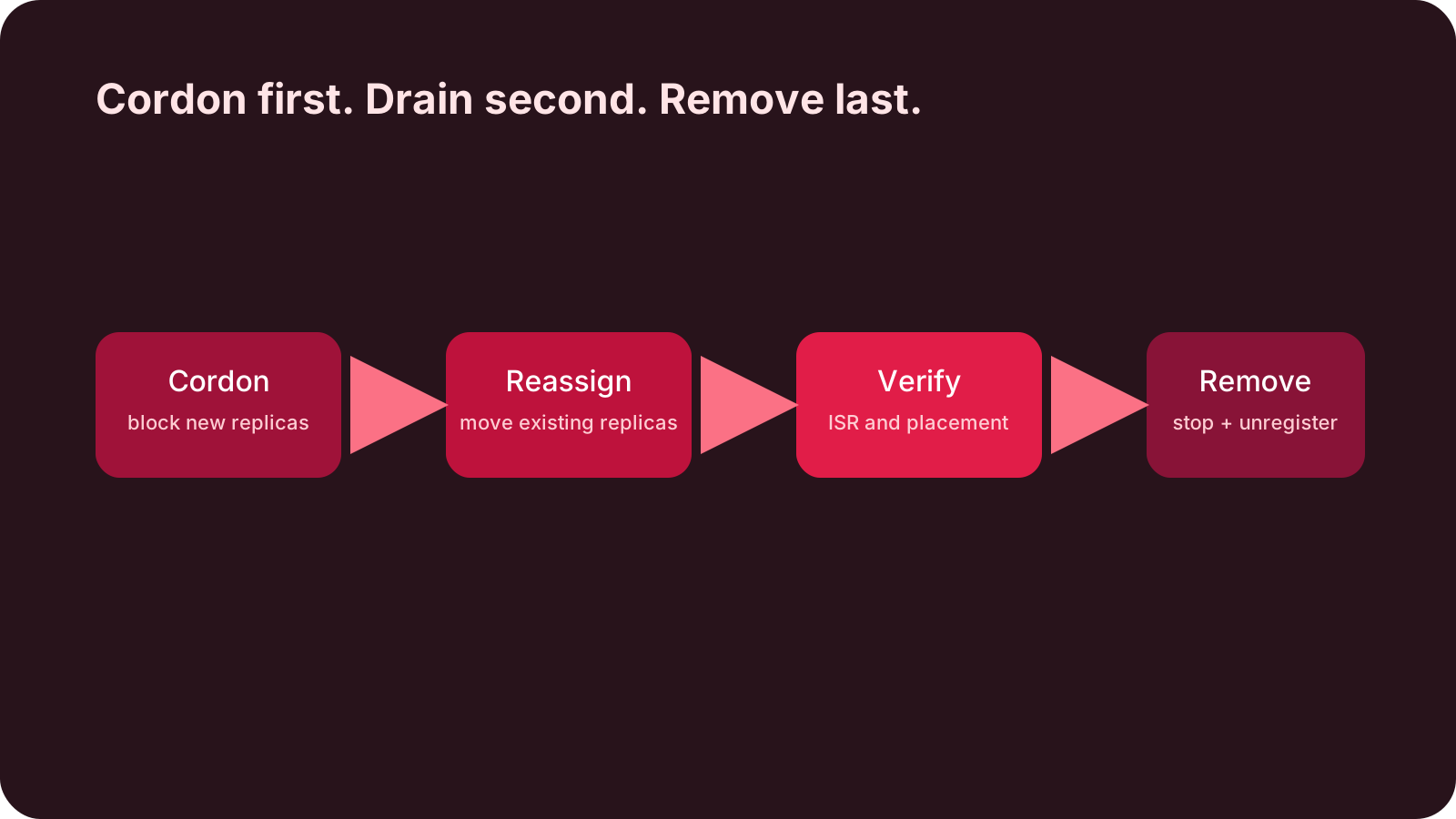
The operational sequence is:
1. Set cordoned.log.dirs=* on the broker.
2. Move all replicas away from the broker.
3. Verify reassignment completion.
4. Stop the broker.
5. Unregister the broker from the cluster.
The Kafka 4.3 operations documentation uses kafka-cluster.sh unregister as the final broker removal step.
bin/kafka-cluster.sh unregister \
  --bootstrap-server localhost:9092 \
  --id 1
Again, the core idea is simple:
cordon blocks new placement.
partition reassignment drains existing replicas.
What Happens to New Partitions?
cordoned.log.dirs reduces the set of valid placement targets. That means you need to think about capacity and replication factor together.
If you create a topic with replication factor 3 but only two brokers have uncordoned log directories, topic creation should fail. KIP-1066 describes this as an INVALID_REPLICATION_FACTOR case.
If explicit replica assignment names a broker that has no uncordoned log directories, Kafka may return INVALID_REPLICA_ASSIGNMENT. If reassignment targets a cordoned location, errors such as INELIGIBLE_REPLICA or KAFKA_STORAGE_ERROR may appear.
These are not surprising failures. They are the feature doing its job.
The operator marked the location as unavailable for new placement,
so Kafka refuses to place new replicas there.
Before using cordon, check:
- Are there enough uncordoned brokers for the required replication factor?
- Are new topic creations or partition increases scheduled?
- Does the reassignment plan target a cordoned broker or directory?
- In JBOD setups, are broker-level and directory-level moves clearly separated?
A Kafka 4.3.1 Edge Case to Watch
There is one caveat worth calling out.
In operational testing, a broker configured with cordoned.log.dirs=* was excluded from new topic creation and automatic replica placement. However, with Kafka 4.3.1, a manual partition reassignment that explicitly included that broker id in the target replica list could still proceed.
So the safer operational interpretation is:
cordoned.log.dirs=*
= excluded from automatic replica placement
≠ guaranteed rejection of explicit manual reassignment
KIP-1066 says that AlterPartitionReassignments should return INELIGIBLE_REPLICA when it tries to place a replica on a broker with no uncordoned log directory. From that perspective, this behavior looks like an edge case that differs from the documented expectation. In production, though, the behavior of the Kafka version you actually run is what matters.
Broker drain or decommissioning automation should therefore validate reassignment plans before execution and reject target replica lists that include cordoned brokers.
CORDONED_BROKERS="6 7"

for broker in $CORDONED_BROKERS; do
  if jq -e --argjson b "$broker" \
    '.partitions[] | select(.replicas[] == $b)' \
    reassignment.json >/dev/null; then
    echo "ERROR: reassignment plan contains cordoned broker $broker"
    exit 1
  fi
done
In short, cordon is an operational guardrail that prevents Kafka from automatically placing new replicas there. It should not be treated as the final safety check for reassignment plans explicitly written by an operator.
Can It Be Monitored?
KIP-1066 adds metrics for cordoned log directories:
kafka.log:type=LogManager,name=LogDirectoryCordoned,logDirectory="<PATH>"
kafka.log:type=LogManager,name=CordonedLogDirectoryCount
The first metric shows whether a specific log directory is cordoned. The second shows the number of cordoned log directories on the broker.
Useful dashboard signals include:
- cordoned log directory count per broker
- offline log directory count
- disk usage
- partition reassignment progress
- under-replicated partitions
- ISR shrink and expand
- produce and fetch latency
cordoned.log.dirs is an operational intent signal. It becomes more useful when it is viewed beside replica movement, ISR stability, and disk usage.
Similar to Kubernetes Cordon, but Not the Same
This feature is easy to understand if you know Kubernetes cordon and drain.
But the analogy has limits.
Kubernetes cordon:
  prevent new Pods from being scheduled

Kafka cordoned.log.dirs:
  prevent new partition replicas from being placed
Neither one automatically moves what already exists.
In Kafka, the drain equivalent is partition reassignment. Kafka still does not automatically generate a full decommissioning plan for brokers or log directories. Operators need to decide which replicas move where.
Still, the feature matters because it prevents the cluster from putting new replicas back onto the location you are trying to empty.
That is a meaningful operational improvement.
Before:
  drain replicas while watching for new placement on the same target

After:
  cordon first, then focus on moving existing replicas
This operating flow also connects to Kafka broker drain in Konduo. Konduo is designed to run broker drain workflows while operators inspect Kafka broker status and metric evidence, and when the target cluster supports cordoned.log.dirs and the conditions fit, it can apply cordon before broker drain where possible. Cordon does not replace drain, but it lets the “block new replica placement first, then move existing replicas” sequence become part of the operating flow.
Summary
cordoned.log.dirs in Kafka 4.3 is not flashy, but it is operationally important.
When scaling in or decommissioning a broker, replacing a disk, or removing a JBOD log directory, the first thing operators need is a way to say:
Do not put new replicas here.cordoned.log.dirs makes that intent visible to Kafka’s placement logic.
But it should not be misunderstood:
- existing replicas keep running
- existing replicas are not moved automatically
- reassignment plans are still operator-owned
- in Kafka 4.3.1, manual reassignment plans should be separately checked for cordoned brokers
- topic creation or reassignment may fail if too few usable targets remain
So this is not automatic decommissioning. It is the cordon step that makes decommissioning safer.
The operating order is simple:
cordon first.
then reassign.
then remove.
Kafka broker removal and disk replacement should now start with that sequence.
Further Reading
For more context connected to this topic, these posts are also worth reading.
- A Kafka Broker Bottleneck Is Not Always Inside Kafka - Follows a Kafka broker incident through OS and storage signals.
- Kafka Ran Out of Memory? Look Beyond Heap to Direct Buffer - Explains Kafka memory through heap, page cache, and direct buffers.
- Kafka 4.0 Consumer Rebalance: Coordination Moves to the Broker - Covers another Kafka 4.x shift toward broker-side operational control.