Engineering Note
What Your Sensor Event Is Missing: Enrich It with fluss-go
Create sensor-metadata and sensor-reading tables with fluss-go beta.10, then scan events and enrich them with current state from a Primary Key Table.

What should happen when a measurement event contains temperature and humidity, but the sensor name, location, and maintenance state live elsewhere? Read the event, look up the sensor’s current metadata in a Primary Key Table, and attach it. Fluss keeps both the current state and the event history in the same system, without an additional cache or external key-value store for this example.
This article takes its scenario from Apache Fluss’s official Apache Fluss Java Client: A Deep Dive. It is not a port of its Java source code. The database, tables, inputs, output, and code here were written independently for Apache Fluss 0.9.1-incubating and fluss-go v0.1.0-beta.10.
fluss-go is a public-beta Go client for Apache Fluss. This tutorial uses its administration API, fadm, to create tables, then uses the data API, fgo, to write current state to a Primary Key Table, scan Log Table events, and enrich them.
Konduo is a tool for managing, operating, and monitoring data infrastructure such as Fluss. Understanding how a data path combines event history with current state makes it easier to interpret the table and bucket information that an operations tool exposes.
The Flow to Verify
sensor_info        Primary Key Table
  sensor_id -> name, location, current state

sensor_readings    Log Table
  sensor_id, measured time, temperature, humidity

LogScanner -> extract sensor_id -> Lookuper -> print enriched reading
Keep the two table roles separate. sensor_info is a Primary Key Table: writing the same sensor_id again changes its current row. sensor_readings is a Log Table: every new measurement remains an event. The reader follows the log’s offsets, then makes a point lookup into the Primary Key Table for each event’s sensor_id.
Why Enrich Events?
Putting a sensor’s name, location, and maintenance state into every event duplicates context. Once that state changes, newly written events and earlier events can easily carry different versions of it. This example keeps the sensor ID and measurement in the event, while the Primary Key Table manages current state in one place.
Looking up and attaching that current state while reading a log event is data enrichment. It is particularly useful for consumers such as dashboards, alerts, and streaming analytics that need the current sensor context. This is not a historical as-of join: the example deliberately attaches the latest state available when it reads the event.
Why Use Fluss for This Flow?
The usual design puts an event log in one system and current state in a separate key-value store or database, leaving the application to read both. In this example, Fluss provides the sequential Log Table scan and the point lookup into the Primary Key Table through the same table API and client. The event path, current state, and table metadata can therefore stay in one system.
That removes the extra connection setup, key serialization, and lookup integration that a separate store would require for this enrichment path. It does not remove every design decision: the application still needs to handle lookup failures, sensors with no current state, and whether it actually needs state as of the event time instead of state at read time.
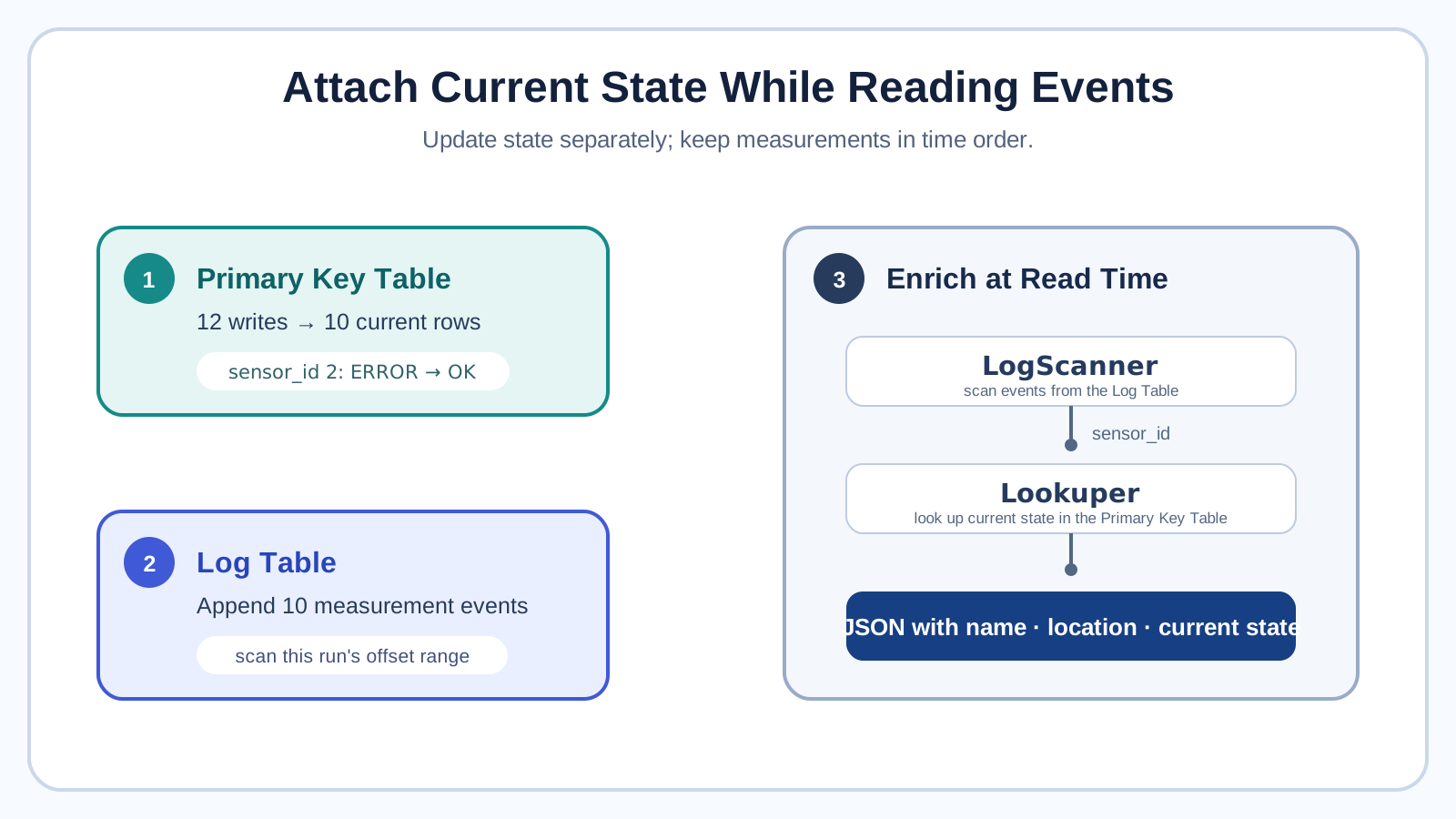
The tutorial makes three outcomes observable:
- Write initial state for ten sensors, then update two of them, while the current-state table remains at ten rows.
- Append ten measurements, then scan only the offset range written by this run.
- Attach the later
OKstate to the measurement forsensor_id2.
Before You Run It
You need a running Fluss 0.9.1-incubating cluster at localhost:9123. The environment from the Apache Fluss Flink Quickstart works unchanged. This example does not touch its demo database; it creates go_sensor_demo and two tables of its own.
Download the complete example into an empty directory.
mkdir fluss-go-sensor-enrichment && cd fluss-go-sensor-enrichment
# Put the downloaded sensor-enrichment.go file in this directory.
go mod init fluss-go-sensor-enrichment
go get github.com/pletorco/fluss-go@v0.1.0-beta.10
go mod tidy
go run sensor-enrichment.go

# When the Coordinator uses another address
FLUSS_BOOTSTRAP=fluss.example:9123 go run sensor-enrichment.go
go mod tidy records the dependencies that fgo and fadm use for this source file. fluss-go is a pre-v1 public beta. This tutorial uses beta.10 names—GetTable, UpsertWriter, AppendWriter, and Lookuper—so do not mix it with beta.9 calls. It also declares TIMESTAMP(3) explicitly for the measurement time so it is compatible with Fluss 0.9.1-incubating.
The following snippets are ordered excerpts of the runnable file. Do not assemble the snippets into a program; use the downloaded file when running the example. The article focuses on the responsibility of each API, while the full source includes imports, types, and resource cleanup.
1. Create the Two Tables with the Administration API
fadm.New shares the already-open fgo.Client. Closing the administration client therefore does not close a separate connection; close the shared fgo.Client when the application finishes.
ctx := context.Background()

client, err := fgo.Open(
    ctx,
    fgo.WithBootstrapServers("localhost:9123"),
    fgo.WithClientSoftware("sensor-enrichment", "0.1.0"),
)
if err != nil {
    log.Fatal(err)
}
defer closeClient(client)

admin, err := fadm.New(client)
if err != nil {
    log.Fatal(err)
}
if err := admin.CreateDatabase(ctx, "go_sensor_demo", fadm.DatabaseDescriptor{
    Comment: "sensor-enrichment tutorial",
}, true); err != nil {
    log.Fatal(err)
}
Here is the Primary Key Table. sensor_id is both the primary key and the bucket key. The tutorial deliberately uses BucketCount: 1 so it can verify the offset range of the ten events it just appended in one place. A production table should choose its bucket count from expected load and key distribution.
sensorInfoPath := fgo.TablePath{Database: "go_sensor_demo", Table: "sensor_info"}

if err := admin.CreateTable(ctx, sensorInfoPath, fadm.TableDescriptor{
    Comment:     "current sensor metadata",
    BucketCount: 1,
    Schema: fgo.Schema{
        Columns: []fgo.Column{
            {Name: "sensor_id", Type: fgo.IntType},
            {Name: "name", Type: fgo.StringType},
            {Name: "location", Type: fgo.StringType},
            {Name: "state", Type: fgo.StringType},
        },
        PrimaryKey: []string{"sensor_id"},
        BucketKey:  []string{"sensor_id"},
    },
}, true); err != nil {
    log.Fatal(err)
}
sensor_readings has no primary key, so it is a Log Table. Repeated measurements from the same sensor remain separate events.
readingPath := fgo.TablePath{Database: "go_sensor_demo", Table: "sensor_readings"}

if err := admin.CreateTable(ctx, readingPath, fadm.TableDescriptor{
    Comment:     "append-only sensor readings",
    BucketCount: 1,
    Schema: fgo.Schema{
        Columns: []fgo.Column{
            {Name: "sensor_id", Type: fgo.IntType},
            {
                Name: "measured_at",
                Type: fgo.TimestampType,
                LogicalType: &fgo.LogicalType{
                    Root:      "TIMESTAMP_WITHOUT_TIME_ZONE",
                    Precision: 3,
                },
            },
            {Name: "temperature_c", Type: fgo.DoubleType},
            {Name: "humidity_pct", Type: fgo.DoubleType},
        },
        BucketKey: []string{"sensor_id"},
    },
}, true); err != nil {
    log.Fatal(err)
}
ignoreIfExists is true only to make repeated tutorial runs possible. It does not compare schemas or recreate an existing table. Production code should read and validate the current definition, or use a deliberate schema-migration process instead of ignoring existence.
2. Update Current Sensor State
After creation, GetTable loads the server’s table, schema, and bucket metadata. UpsertWriter is the writer for a Primary Key Table.
infos, err := client.GetTable(ctx, sensorInfoPath)
if err != nil {
    log.Fatal(err)
}

inputInfos := []sensorInfo{
    {1, "Roof temperature sensor", "roof", "OK"},
    {2, "Lobby humidity sensor", "lobby", "ERROR"},
    {3, "Server room sensor", "server-room", "MAINTENANCE"},
    {4, "Warehouse pressure sensor", "warehouse", "OK"},
    {5, "Conference room humidity sensor", "conference-room", "OK"},
    {6, "Office 1 temperature sensor", "office-1", "LOW_BATTERY"},
    {7, "Office 2 humidity sensor", "office-2", "OK"},
    {8, "Lab pressure sensor", "lab", "ERROR"},
    {9, "Parking pressure sensor", "parking", "OK"},
    {10, "Backyard temperature sensor", "backyard", "OK"},
    {2, "Lobby humidity sensor", "lobby", "OK"},           // state changed
    {8, "Lab pressure sensor", "lab", "CALIBRATING"},       // state changed
}

writer, err := client.NewUpsertWriter(
    ctx,
    infos,
    fgo.WithUpsertBatchLimits(1<<20, len(inputInfos)),
)
if err != nil {
    log.Fatal(err)
}
defer closeUpsertWriter(ctx, writer)

for _, info := range inputInfos {
    result := writer.Upsert(ctx, fgo.Row{
        info.SensorID, info.Name, info.Location, info.State,
    }).Await(ctx)
    if result.Err != nil {
        log.Fatal(result.Err)
    }
}
if err := writer.Flush(ctx); err != nil {
    log.Fatal(err)
}
Await checks each write result. Flush waits until every write accepted before the call reaches a terminal outcome. The example writes initial state for ten sensors, then writes sensor_id 2 and 8 again. The input therefore has twelve rows, while the Primary Key Table ends with ten rows; the two final states are OK and CALIBRATING. Because the example supplies every column, the Quickstart-style default merge behavior updates the current row for each key.
3. Append Measurements and Keep Their Position
Use AppendWriter for the event table. Queue all ten records, flush once, and retain their bucket and offsets from the responses.
inputReadings := []sensorReading{
    {1, time.Date(2026, time.August, 4, 9, 0, 0, 0, time.UTC), 24.1, 43.2},
    {2, time.Date(2026, time.August, 4, 9, 15, 0, 0, time.UTC), 22.7, 52.8},
    {3, time.Date(2026, time.August, 4, 9, 30, 0, 0, time.UTC), 20.4, 38.5},
    {4, time.Date(2026, time.August, 4, 9, 45, 0, 0, time.UTC), 18.9, 48.1},
    {5, time.Date(2026, time.August, 4, 10, 0, 0, 0, time.UTC), 23.5, 46.3},
    {6, time.Date(2026, time.August, 4, 10, 15, 0, 0, time.UTC), 21.8, 44.9},
    {7, time.Date(2026, time.August, 4, 10, 30, 0, 0, time.UTC), 22.1, 47.5},
    {8, time.Date(2026, time.August, 4, 10, 45, 0, 0, time.UTC), 20.7, 49.2},
    {9, time.Date(2026, time.August, 4, 11, 0, 0, 0, time.UTC), 19.6, 51.7},
    {10, time.Date(2026, time.August, 4, 11, 15, 0, 0, time.UTC), 25.0, 41.8},
}

readings, err := client.GetTable(ctx, readingPath)
if err != nil {
    log.Fatal(err)
}
writer, err := client.NewAppendWriter(
    ctx,
    readings,
    fgo.WithAppendBatchLimits(1<<20, len(inputReadings)),
    fgo.WithAppendBatchTimeout(5*time.Millisecond),
)
if err != nil {
    log.Fatal(err)
}
defer closeAppendWriter(ctx, writer)

futures := make([]*fgo.WriteFuture, len(inputReadings))
for i, reading := range inputReadings {
    futures[i] = writer.Append(ctx, fgo.Row{
        reading.SensorID, reading.MeasuredAt,
        reading.TemperatureC, reading.HumidityPct,
    })
}
if err := writer.Flush(ctx); err != nil {
    log.Fatal(err)
}

results := make([]fgo.WriteResult, len(futures))
for i, future := range futures {
    results[i] = future.Await(ctx)
    if results[i].Err != nil || !results[i].OffsetKnown {
        log.Fatalf("append %d: %v", i, results[i].Err)
    }
}
first, last := results[0], results[len(results)-1]
An append cannot use its result as a scan position when the offset is unknown. This code checks every WriteFuture, then retains the first and last offsets. The complete example also verifies that the ten offsets are contiguous in the one bucket. That keeps the following scan from treating events written by another run as its own.
4. Scan Events and Attach Current Metadata
LogScanner follows event offsets; Lookuper finds the current sensor row by sensor_id. Release every scan batch once its records have been handled.
lookuper, err := client.NewLookuper(ctx, infos, fgo.WithLookupBatchLimits(100, 4))
if err != nil {
    log.Fatal(err)
}
defer closeLookuper(lookuper)

scanner, err := client.NewLogScanner(
    ctx,
    readings,
    fgo.AtOffset(first.BaseOffset),
    fgo.WithScanRowLimit(int64(len(inputReadings))),
    fgo.WithScanStoppingOffsets(map[int32]int64{
        first.Bucket: last.BaseOffset + 1,
    }),
)
if err != nil {
    log.Fatal(err)
}
defer closeScanner(scanner)

enriched := make([]enrichedReading, 0, len(inputReadings))
for !scanner.Done() {
    batch, err := scanner.Poll(ctx)
    if err != nil {
        log.Fatal(err)
    }
    for _, record := range batch.Records {
        reading := readingFromRow(record.Record.Value)
        lookups := lookuper.Lookup(ctx, fgo.PrimaryKey{reading.SensorID})
        if len(lookups) != 1 {
            log.Fatalf("sensor %d: expected one lookup result, got %d", reading.SensorID, len(lookups))
        }
        lookup := lookups[0]
        switch {
        case errors.Is(lookup.Err, fgo.ErrNotFound):
            log.Fatalf("sensor %d has no current metadata", reading.SensorID)
        case lookup.Err != nil:
            log.Fatal(lookup.Err)
        }
        info := infoFromRow(lookup.Row)
        enriched = append(enriched, enrichedReading{
            SensorID: reading.SensorID, MeasuredAt: reading.MeasuredAt,
            TemperatureC: reading.TemperatureC, HumidityPct: reading.HumidityPct,
            SensorName: info.Name, Location: info.Location, State: info.State,
        })
    }
    batch.Release()
}
printJSON("[4/4] Scan readings and enrich each with current sensor metadata:", enriched)
The full file prints inputs and results from every stage as JSON. The final output combines an event with the current sensor state.
{
  "sensor_id": 2,
  "measured_at": "2026-08-04T09:15:00Z",
  "temperature_c": 22.7,
  "humidity_pct": 52.8,
  "sensor_name": "Lobby humidity sensor",
  "location": "lobby",
  "state": "OK"
}
sensor_id 2 starts as ERROR, then is written again as OK before the events are appended. The output therefore shows the state that is current at lookup time, rather than the state at the time of measurement.
What This Example Does Not Guarantee
This flow attaches the state that is current when the event is read. It does not perform an as-of join that recreates the sensor state at the time of measurement. If a sensor moves after its event was written and before the scan, the lookup can return the new location.
When historical correctness is required, include the needed metadata in the event or design a separate state history with versions or validity times. The tutorial also performs one lookup per row to keep the flow visible. A high-throughput application should submit groups of keys to Lookuper and define separate handling for missing keys, partial failures, and timeouts.
Conclusion
A Fluss Log Table retains time-ordered facts, while a Primary Key Table provides current state. Connecting AppendWriter, LogScanner, and Lookuper lets a Go application combine the two directly. The important design decision is still semantic: attaching current state and reconstructing historical state are different requirements.
Further Reading
- Reading and Writing Apache Fluss Tables from Go: fluss-go Public Beta - Introduces beta.10 API names and the basic Primary Key Table and Log Table operations.
- One Connection, One Table per Thread: Apache Fluss Java Client - Compares the same table models through the Java Client’s object-lifecycle rules.
- Your First Apache Fluss Run: What the Flink Quickstart Shows - Prepares a local Fluss environment and demonstrates the two table models.