Engineering Note
Where Is the Web Application Slow? A Guide to Narrowing the Problem
Map the path from browser through network, application, and database, then compare evidence from the same user action to narrow a performance problem and verify the fix.
Users report a slow page. We do not yet know whether the browser starts work late, the network introduces waiting, or the application or database is slow. Healthy dashboards for individual systems cannot, by themselves, explain the user’s wait.
Start by dividing the entire path and narrowing the investigation with evidence from the same user action. Once a slow stage is identified, split it further. Move stages confirmed to be healthy lower on the investigation list.
The service-side path from its network gateway through the application and database may be healthy. In that case, shift attention to the user’s device, access network, gaps between requests, and display work. That decision still needs evidence from the affected requests and time window.

1. Define the action and comparison conditions
Turn “the page is slow” into “on mobile, opening the order list takes too long before the first results appear.” Record the time, route, release, device and browser, network conditions, and whether it was a first or repeat visit. That is a more useful starting point than investigating every system at once.
Capture the same action under healthy conditions too. First distinguish whether the issue affects particular users, screens, or time windows. Change one condition at a time: switch networks on the same device, or devices on the same network. If DNS answers, destination servers, authentication, or cache state also change, do not treat the result as proof of one specific cause.
Define healthy behavior too. A regression from an earlier release and a breach of an acceptable user target are different questions. If a Service Level Objective (SLO) exists, align the action, user population, evaluation window, and success criteria. Otherwise, establish a healthy baseline under comparable conditions. Check whether deployments, configuration, data sizes, or traffic mix changed when the issue began, without treating temporal coincidence as proof of causation. Service level objectives
2. Map the path and compare the broad intervals
Write down the actual deployment path. This example lists possible components; the placement and order of a content delivery network (CDN), web application firewall (WAF), and load balancer (LB) vary by service.
User action → browser prepares requests
→ user device, access network, internet or private network
→ service-network boundary and intermediaries → application → DB, cache, external APIs
→ response transfer → browser data processing and display
Here, a network gateway is a device or function connecting the service network to another network. Distinguish it from an API gateway that handles HTTP requests. If an API gateway exists, list it separately. Include the response path, and identify requests that actually terminate in a cache or Service Worker.
There is no need to instrument every device in detail immediately. First compare the whole user action, the request as seen by the browser, and server-side processing. Differences in their coverage tell you where to investigate next.
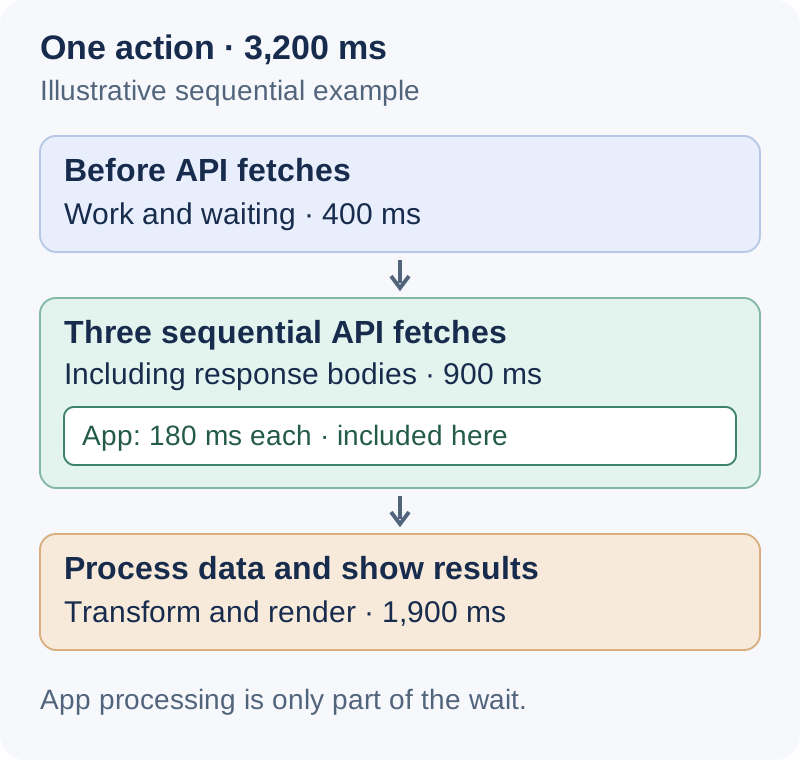
The following is an illustrative sequential example, not a production measurement.
| Stage of the user action | Duration |
|---|---|
| Work and waiting between the click and the first API fetch | 400ms |
| Three sequential API calls, including receiving their bodies | 900ms |
| Transforming data, updating the view, and displaying results | 1,900ms |
| Total user wait | 3,200ms |
The screen can take 3.2 seconds even if application processing takes 180ms for each API call. Those 180ms durations are already contained within the 900ms stage; they must not be added again. With parallel work, investigate the dependency path that delays the result, rather than summing every duration. Percentiles from different request populations cannot be added or subtracted to construct this timeline.
Record Network and Performance for the same reproduction in Chrome DevTools. Use the request timeline (Waterfall) and the cause of each request (Initiator) to identify calling order and dependencies, then examine JavaScript execution, style calculation, layout, and paint after responses arrive. Compare the devices and network conditions where the problem occurs, rather than relying on a developer’s workstation alone. Network tools · Performance tools
3. Narrow the scope using evidence across boundaries
Correlate browser requests and server records with a request ID or distributed tracing context. A trace records a request’s path across services; a span represents an individual operation within it. Follow parent and child spans from the application into database calls, and leave uninstrumented intervals explicitly unresolved. Network devices do not necessarily receive HTTP request IDs; where necessary, use connection information and device or flow records from the relevant period. Distributed traces and spans
| Evidence from the same action | Scope to examine next |
|---|---|
| Business completion is slow, but each request completes quickly through body receipt | Work before requests, dependencies between them, rendering afterward |
| Both the browser request and server-side processing are slow | Split the server path into ingress, application, and dependencies |
| Request handling at ingress is slow, but application processing is fast | Ingress queues, routing, retries, buffering, and connections to the application |
| A DB-related stage dominates application processing | Separate pool acquisition, the DB round trip, query execution, and lock waits |
| The server-side path is fast, but browser request completion is slow | Unmeasured intermediaries, response transfer, the user’s network and device |
These comparisons choose the next investigation scope. Do not subtract server duration from browser duration and label the remainder “network time.” Boundaries, body transmission, retries, and buffering may differ. When comparing timestamps from different hosts, check clock error too.
Before concluding that the server is healthy, establish at least the following:
- The affected requests, time window, and release are included.
- Measurement boundaries and included waits are understood.
- Failures, timeouts, cancellations, and missing observations have been checked.
- Distributions and the affected user population have been examined, not just averages.
The p95 and p99 values mark the points at or below which 95% and 99% of observations fall. Healthy aggregate averages, p95, and p99 can hide a slow route or a small user population. Do not average per-instance p99 values or treat an error-biased trace sample as the full request population. Aggregate histogram distributions over the same observation window before estimating a combined percentile. Classic histograms with fixed buckets require matching boundaries. Native histograms with standard exponential buckets can reconcile compatible resolutions. In either case, check that the resulting resolution distinguishes the durations of interest. Prometheus histograms
4. Find the next evidence within the identified scope
If the affected request’s processing and response transfer are healthy from the service network’s gateway through the application and database, prioritize the path outside that scope. Examine work before browser requests and after receipt, the user’s network, and unmeasured intermediaries. A server sending a response is different from the browser receiving and using its complete body.
If the delay is inside the server path, split that stage further. Low CPU can coexist with long queues or connection-pool waits. A “slow DB call” needs to become a question about pool acquisition, the database round trip, or query execution before a fix can be selected.
Read latency alongside traffic, errors, and saturation. Align incoming and completed requests per second, in-flight requests, queue lengths and waits, and resource limits on the same timeline. Flat completion throughput with growing queues suggests a capacity constraint or bottleneck. Low average CPU can still hide a saturated instance or connection pool. Google SRE monitoring signals
Count retries separately from user actions. Several fast attempts can still produce slow completion through delays between retries, while the extra requests increase load. Correlate original requests with retry counts and waits. Retries and load
| Observation | Evidence to examine next | Change to consider if supported |
|---|---|---|
| A request starts long after the click | Main-thread work, debounce, token refresh, prerequisite requests | Split long work, remove unnecessary waits, parallelize independent calls |
| Queueing, Stalled, or connection phases are long | Priority, connection reuse, DNS and TLS, proxies or VPNs | Reduce unnecessary requests; investigate the connection and proxy path |
| Browser first-byte waiting is long but the same request is fast on the server | CDN, WAF, and load-balancer waits; round trips and retries | Correct the specific edge policy, route, or connection issue |
| Headers arrive quickly but the body takes time | Transfer size, compression, bandwidth, streaming and buffering, browser load | Reduce payloads, paginate, adjust compression or delivery |
| Individual APIs are fast but the screen waits for many calls | Serial dependencies, duplicates, polling intervals | Remove dependencies, combine necessary data, adjust polling |
| A particular wait dominates server processing | Queues, pool acquisition, DB locks and queries, external calls and retries | Reduce resource holding time, improve queries or calling patterns, address demonstrated resource constraints |
| Responses finish well before the view changes | Parsing and transformation, large DOMs, repeated renders, layout and paint | Reduce data and DOM size, virtualize lists, split work, move suitable computation to a Worker |
DevTools Waiting (TTFB), short for Time to First Byte, includes network round-trip latency and server response preparation. A long Content Download is not proof of a slow connection: a busy browser can also delay reading the body. Do not apply HTTP/1.1 connection limits unchanged to HTTP/2 or HTTP/3. DevTools timing definitions
Also distinguish why a request is absent from server HTTP records. Browser cache or a Service Worker may have handled it; a CDN may have served it, or it may have failed at the WAF. Check preflights, authentication redirects, and external scripts or fonts that are outside the dashboard’s API population.
5. Choose signals and tools for the narrowed scope
Choose signals for the suspected stage from the table below. Focus on evidence for the next decision instead of adding every metric at once.
| Layer | Initial signals | Question |
|---|---|---|
| Real browsers | Loading performance, responsiveness, visual stability, business-action completion time, JS errors and request failures | Which screens, devices, or regions are affected? |
| Network gateways and firewalls | Connection state, interface errors and drops, throughput and saturation | Is there a connection or transfer problem at the service-network boundary? |
| CDN, WAF, LB, API gateway | Request counts, errors, timeouts, cancellations, latency distributions, cache hits, response sizes | How far did requests get, and which boundary is slow? |
| Application | Processing time, queue and event-loop delay, thread and connection-pool waits, GC pauses | Is execution slow, or waiting to execute? |
| DB, cache, external APIs | Pool acquisition, query duration and lock waits, cache hits, retries | Which dependency delays completion? |
| Runtime environment | CPU usage and throttling, memory pressure, disk I/O latency, packet loss and retransmissions | Is an external resource constraint involved? |
| Telemetry pipeline | Collection success, data lag and drops, Collector queues and memory, export failures | Is the system healthy, or is evidence missing? |
Narrow server internals with profiling
If a trace identifies a function or service but does not explain the time inside it, use profiling. Sampling runtime call stacks and other events helps identify code consuming CPU, memory allocations, or lock contention. JVM applications can use tools such as async-profiler. CPU execution time differs from elapsed time including waits, so a CPU profile alone cannot explain every delay.
Limit the target processes, recording duration, and frequency, and check instrumentation overhead. Once the problem is narrowed to query execution, continue with that layer’s tools, such as query execution plans and wait records.
Measure real user experiences automatically
Real User Monitoring (RUM) uses JavaScript in the page to measure performance in the user’s browser and send results to a collection server. Developers deploy the code or SDK, and operators inspect the results remotely. Users use the service normally, with no separate measurement task. web-vitals measurement and reporting examples
Page loading, responsiveness, and resource timings can be collected automatically where supported. Developers define and instrument the boundaries of business intervals such as “search starts to results displayed.” User Timing API
Use RUM to identify affected screens, devices, and releases, then reproduce the issue in DevTools. Synthetic tests run predefined actions in an automated browser, complementing controlled comparisons and reachability checks. Failures before the page or measurement code executes may leave no RUM record: missing data is not evidence of health. Check gaps caused by browser support, sampling, and failed delivery too.
Distinguish loading, responsiveness, and visual stability
The following Core Web Vitals are metrics RUM can collect. The question each one answers makes their roles easier to distinguish.
| Metric | What does it measure? | Good-experience threshold |
|---|---|---|
| Largest Contentful Paint (LCP) | How quickly does the main content appear? Time from the start of page loading until the largest visible image or text block is rendered | At or below 2.5 seconds |
| Interaction to Next Paint (INP) | How quickly does the page respond to interaction? Responsiveness assessed through the delay from clicks, taps, or key presses to the next paint | At or below 200ms |
| Cumulative Layout Shift (CLS) | How much does the layout move unexpectedly? A score for shifts such as text moving while being read or a button moving before a click. It is not a duration | At or below 0.1 |
INP represents interaction latency across a page visit, rather than reporting each click separately. It generally uses the slowest interaction, excluding some outliers when a visit contains many interactions.
Evaluate these thresholds across page-visit metric values at p75—the value at or below which 75% of observations fall—separately for mobile and desktop. They are different objectives from a server API’s p99 or a business-action completion target. Core Web Vitals documentation
Good INP can coexist with slow business completion. A loading indicator may appear immediately while search results arrive much later. Instrument business completion and internal single-page application (SPA) transitions separately. What INP measures
Do not finalize LCP, INP, and CLS together when API responses finish. INP and CLS can change as the page is used; collect them at the reporting points provided by a library such as web-vitals. Metric reporting behavior
Sample sessions and retain detail for problem actions
The following illustrative design selects 5% of sessions at random. Check SDK capabilities and choose rates and thresholds for your service.
- Follow actions within selected sessions to completion. Do not resample each request. Distinguish receipt of the required response bodies from display of the result, rather than waiting for all page traffic, including polling, to finish.
- Include healthy actions in baseline statistics. Keep counts by outcome, completed-action duration distributions, the selection rate, and policy version for the sample.
- Send detail for slow or failed actions. For threshold breaches, errors, timeouts, and cancellations, add request timings, screen and release information, browser context, and trace IDs where available. Coverage remains limited to the selected sample.
- Record actions that do not finish as unfinished. Set an observation deadline separately from the threshold and report elapsed time if it expires. Correlate later completion reports with the same action ID to avoid double counting. Page termination or lost connectivity can still prevent reporting.
With a one-second threshold, for example, a 400ms search contributes to baseline statistics; a 1.8-second search also sends detail. Do not include unfinished actions reaching their deadline in the successful-completion duration distribution.
Do not calculate overall averages, p95, p99, or incidence rates from slow cases alone. Baseline statistics describe the sample’s experience; detailed events support diagnosis. The companion article, How Much Telemetry Should We Keep?, covers cost policy.
Use DevTools to investigate a reproduced action
After reproducing the issue, a developer can run this in DevTools Console to inspect fetch and XHR entries still in the resource buffer. This is manual diagnostic code, distinct from the automatic RUM collection described above.
const requests = performance.getEntriesByType('resource')
  .filter((entry) => ['fetch', 'xmlhttprequest'].includes(entry.initiatorType));

console.table(requests.map((entry) => ({
  path: new URL(entry.name).pathname,
  totalMs: Math.round(entry.duration),
  requestToFirstByteMs: entry.requestStart > 0 && entry.responseStart > 0
    ? Math.round(entry.responseStart - entry.requestStart) : null,
  bodyMs: entry.responseStart > 0
    ? Math.round(entry.responseEnd - entry.responseStart) : null,
  transferBytes: entry.transferSize,
})));
totalMs covers resource fetching through response completion, not the click through display. First-byte waiting is not server execution time alone. Detailed cross-origin timings require Timing-Allow-Origin; a zero’s meaning depends on the field, including caching or restricted exposure. Ongoing collection needs PerformanceObserver and management of the finite buffer. Resource Timing API
To compare browser records with server instrumentation, selected server durations can also be exposed through Server-Timing, which complements rather than replaces a distributed trace.
Expand detailed instrumentation only within the suspected scope, and return it to baseline when the investigation ends.
6. Validate the fix with the same user action
Return to the illustrative 3.2-second wait for the order list. The following shows an investigation sequence, not measurements from a real incident.
- Check server processing for the same requests. Correlate the three browser API calls with server records. If each application duration is 180ms and the requests show no abnormal server-side waits, prioritize the remaining browser-observed time. Application durations alone do not establish that the entire network path is healthy.
- Locate the gap between receipt and display. The first request starts 400ms after the click, and sequential calls take 900ms. The last response body therefore arrives at 1.3 seconds. Results appear at 3.2 seconds, making the 1.9 seconds after receipt the next investigation scope.
- Inspect those 1.9 seconds in the Performance recording. Identify time spent in JavaScript, data transformation, layout, and paint. If the recording shows repeated rendering of a large list, consider reducing displayed items or virtualizing the list. Establish the cause from the recording before selecting the fix.
- Remeasure the stage and the whole action. Check whether both the 1.9-second post-response stage and the click-to-results duration decrease. Keep the 400ms before the first request and the 900ms of sequential calls as remaining improvement candidates.
Repeat before-and-after measurements with comparable screens, devices, networks, cache states, request rates, and concurrency, then confirm changes in actual user distributions. If the issue appears only under high load, verify the improvement under that load too. Track request volume, errors, and resource use too. Check that the problem has not moved elsewhere: parallel requests can increase DB load, while caching can return stale results.
Finish with five things recorded:
- The slow user action, definition of completion, and comparison baseline
- Measurement boundaries across the path and missing coverage
- Evidence narrowing the problem and the stages confirmed healthy
- Before-and-after user time, error rate, and resource impact
- Normal collection policy and the end condition for extra instrumentation
Web performance investigation starts with the unexplained part of the user’s wait. Narrow the scope using evidence across boundaries, and follow through by verifying that the same action actually became faster.
Further Reading
- JVM Metrics Alone Cannot Explain a Container — examines resource constraints beyond application-level metrics.
- Should Metrics Be Pulled or Pushed? Comparing Collection Models — discusses collection failures, buffering, and operational responsibilities.