Engineering Note
Your Kafka Looks Balanced. Your Brokers Disagree
Leader partition counts can look even while Kafka brokers carry very different network and storage load. This post explains how to read balancing through partition weight.
One of the first balancing signals Kafka operators check is the number of leader partitions on each broker.
Broker A: 100 leaders
Broker B: 100 leaders
Broker C: 100 leaders
That looks healthy. Every broker owns the same number of leader partitions, so the cluster appears balanced.
Then the broker metrics tell a different story.
Broker A: high network out, fast disk growth
Broker B: moderate
Broker C: plenty of headroom
This post expands on my Kafka Summit session, Is Your Kafka Truly Load Balancing? Pro Tips for Leader Partition Distribution, for a practical operations audience. The core idea is simple: evenly distributed leader partitions do not guarantee evenly distributed Kafka load.

The short version
Keep these points in mind when you read Kafka balancing:
- Leader partition count is a useful starting point, but it is not enough.
- Each partition has its own produce rate, consume rate, message size, and retention footprint.
- The leader broker can carry more network pressure through writes, replication fetches, and consumer fetches.
- Storage usage and growth rate matter, or large partitions can quietly cluster on one broker.
- Rebalancing should consider partition weight, not only leader count.
In one sentence:
Kafka load balancing is not about making partition counts equal.
It is about placing partitions with different weights across brokers.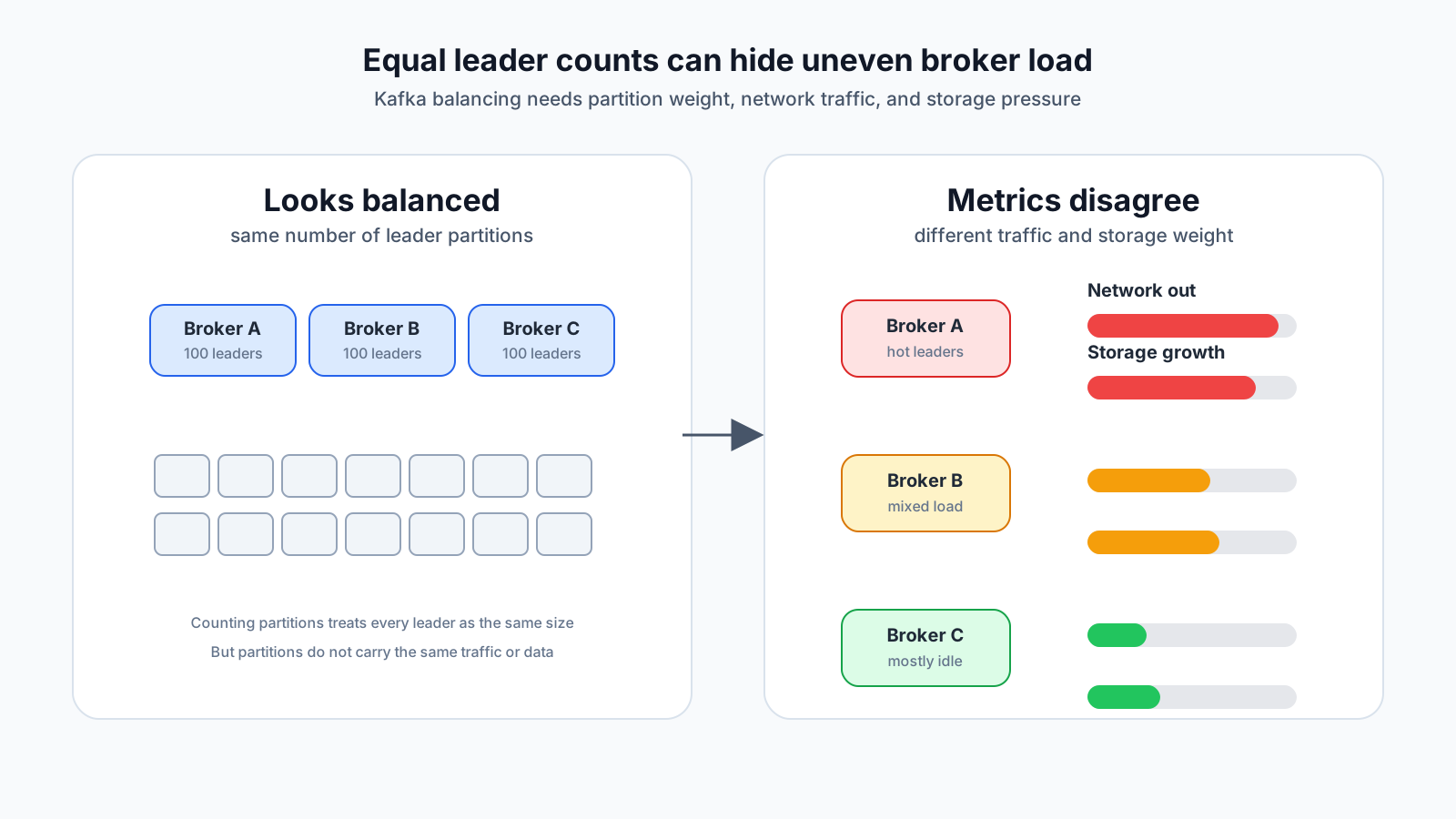
Why leader count is not enough
Kafka partitions share the same abstraction, but not the same weight.
One partition may be almost idle. It receives a few megabytes per day and is read occasionally. Another partition may receive tens of megabytes per second, serve multiple consumer groups, and grow quickly because of retention.
Both count as one leader partition. They do not cost the broker the same amount of work.
Partition p0: 100 KB/sec in, 200 KB/sec out
Partition p1: 30 MB/sec in, 120 MB/sec out
If you count them as equal units, balancing decisions become distorted. Leader count tells you how many partitions a broker owns. It does not tell you how much work those partitions create.
What a leader broker actually carries
In Kafka, producers write to the partition leader. Followers fetch data from the leader to keep replicas in sync. Consumers usually fetch from the leader too.
A leader broker may carry:
- producer requests
- record append and page cache pressure
- follower replication fetch responses
- consumer fetch responses
- network in and out
- disk read/write and retention footprint
So a broker with more leaders is often more likely to be busy. But the more important question is which leaders it has. Metrics change depending on whether a broker owns leaders for hot topics, large compacted partitions, long-retention audit topics, or topics read by many consumer groups.
Network tells the truth quickly
If leader partition counts are even but one broker has much higher network out, hot leaders may be concentrated there.
For example, this is not a balanced cluster even though the leader counts match:
| broker | leader count | network in | network out |
|---|---|---|---|
| A | 100 | 350 MB/s | 900 MB/s |
| B | 100 | 210 MB/s | 360 MB/s |
| C | 100 | 120 MB/s | 180 MB/s |
Moving a few leaders away from A may not help if those leaders are idle. Moving two hot partition leaders may make a much bigger difference.
That is why partition-level metrics are necessary when choosing reassignment candidates.
bytes in/sec per topic-partition
bytes out/sec per topic-partition
consumer group fetch patterns
replication fetch impact
broker request handler saturation
Storage needs the same treatment
Network is not the only hidden imbalance. Broker disk usage and growth rate should be part of the same conversation.
Some topics do not have huge traffic, but they retain data for a long time. Some topics have large messages, compaction behavior, or delete retention settings that produce a larger broker disk footprint than expected.
Leader movement affects network load. Replica placement and partition reassignment affect storage placement. Treat those as related but different balancing goals.
| Goal | What to inspect |
|---|---|
| reduce leader load | leader placement, bytes in/out, consumer fetch |
| reduce disk usage | replica placement, partition size, growth rate |
| long-term stability | retention, topic growth, broker disk headroom |
| change cost | reassignment traffic, replication throttle, operating window |
When moving a large partition, do not look only at the final balanced state. The replication traffic created during reassignment can worsen consumer lag, produce latency, and broker network pressure.
Redefine balance as partition weight
In practice, it helps to think in terms of partition weight.
partition weight =
  produce bytes/sec
  + consume bytes/sec
  + replication cost
  + storage size
  + growth rate
You do not need one perfect formula for every cluster. The important step is dropping the assumption that one leader always equals one unit of load.
A simple score is often enough to improve the conversation.
traffic score = bytes in/sec + bytes out/sec
storage score = partition size + growth rate
broker pressure = network utilization + disk utilization + request saturation
Then the balancing question changes.
Weak question:
How many leaders does Broker A have?

Better question:
Which hot leaders and large replicas are concentrated on Broker A?
A safer reassignment order
The order I prefer is:
- Check leader count per broker.
- Check broker network in/out, request latency, and request handler idle.
- Check broker disk usage and growth rate.
- Check bytes in/out and size per topic-partition.
- Look for hot leaders and large replicas concentrated on the same broker.
- Move candidates where small changes create large improvements.
- Limit the temporary load created by reassignment and leader movement.
The sixth step matters. Moving dozens of partitions mechanically to make leader counts pretty may be less effective than moving a few hot leaders that dominate network out.
Preferred leader election may not be enough
Kafka has preferred leader election. It can move leadership back to the preferred replica from the replica assignment and clean up leader distribution.
But preferred leader election follows the preferred replica placement. If that placement was created without traffic weight, election alone may not balance real broker load.
Topics also change over time. A topic that was ordinary at creation time can become a hot topic later. A new consumer group can increase fetch load. Today’s preferred placement is not guaranteed to be tomorrow’s healthy placement.
What to put on the dashboard
A Kafka balancing dashboard needs more than leader count.
At minimum, put these signals together:
- leader count per broker
- bytes in/out per broker
- request latency and request handler idle per broker
- disk used, disk available, and disk growth rate per broker
- produce/fetch bytes per topic-partition
- top N hot partitions
- top N largest partitions
- reassignment traffic and throttling state
- under-replicated partitions and ISR shrink events
Cluster resources like Kafka are easier to operate when multiple signals are read together instead of as isolated metrics. This operational angle is central to Konduo. Konduo connects Kafka and other infrastructure resources through plugins so teams can read brokers, topics, consumer groups, metric evidence, and alert response in one operating flow.
Checklist
When reviewing leader partition balancing, ask:
- Are leader counts similar across brokers?
- If leader counts are similar, are network in/out numbers still very different?
- Does one broker own many of the hottest partitions?
- Are large partitions concentrated on one broker?
- Are disk usage and disk growth rate both balanced?
- Is consumer fetch traffic pushing up network out on specific brokers?
- Does preferred leader election improve real load, or only make counts look better?
- Can the cluster absorb the replication traffic created by reassignment?
- Did you check consumer lag, produce latency, and request handler saturation after the change?
The final rule is simple:
Leader count is only the map.
Broker metrics show the terrain.
If you want to know whether a Kafka cluster is truly balanced, do not stop at partition counts. Look at partition weight and the pressure each broker actually carries.
Further Reading
For more context connected to this topic, these posts are also worth reading.
- The Kafka Broker Slowed Down, but Kafka Was Not the Cause - Tracks a Kafka symptom down to storage path and I/O behavior.
- Consumer Lag Is Not a Health Score: Thinking in Kafka Consuming Pressure - Reframes consumer lag as processing pressure.
- Can Kafka Client Metrics Really Close the Observability Gap? - Reviews how much Kafka client metrics can close the observability gap.